Introduction
In this article, we will understand the concepts of designing a sytem. We will look at concepts of DNS servers, Content Delivery Networks, Load Balancers and Gateways, APIs, Databases, Security and many more. Then we'll see which AWS component is used to implement the concepts.
This will be a long article(but not so difficult) so be patient and grasp the concepts don't rush directly into AWS systems.
Basic System design Concepts and some AWS components
We will understand concepts of system design and AWS components that help implement these conceps using an example in this article. I will not show exactly how to use and setup the AWS components discussed here, the aim of this article is to provide concepts and give information about the AWS components. This article is not a setup guide.
To understand systems, lets see what happens when you type in 'www.abc.com', in your browser.
1. DNS Query
This is the process that your browser does to translate the domain name into IP address of the server.
To understand DNS we need to understand a bit about the internet naming system hierarchy.
To understand how an IP address gets to your home router, we follow a strict delegation hierarchy. IANA sits at the top, but the responsibility flows downward through regional, national, and local levels.
1. IANA (Internet Assigned Numbers Authority)
At the very top of the hierarchy sits IANA. It manages the global pool of IPv4 and IPv6 addresses. Instead of dealing with end-users or individual countries, IANA allocates large blocks of IP addresses to five Regional Internet Registries (RIRs).
2. RIRs (Regional Internet Registries)
These five non-profit organizations are responsible for managing and distributing IP addresses for specific large geographic regions of the world:
- AFRINIC (African Network Information Centre) – Serves Africa.
- ARIN (American Registry for Internet Numbers) – Serves Antarctica, Canada, parts of the Caribbean, and the United States.
- APNIC (Asia Pacific Network Information Centre) – Serves East Asia, South Asia, Southeast Asia, and Oceania.
- LACNIC (Latin America and Caribbean Network Information Centre) – Serves Central America, South America, and parts of the Caribbean.
- RIPE NCC (Réseaux IP Européens Network Coordination Centre) – Serves Europe, Central Asia, Russia, and the Middle East.
3. NIRs (National Internet Registries) — Optional Layer
In some regions (especially within APNIC and LACNIC), RIRs allocate IP blocks to National Internet Registries. These are country-level organizations (like CNNIC in China or JPNIC in Japan) that handle allocations for their specific nation. If a country doesn't have an NIR, the hierarchy skips directly to the next level.
4. LIRs (Local Internet Registries)
RIRs (or NIRs) allocate smaller blocks of IP addresses to Local Internet Registries. These are typically large telecommunications companies, enterprise organizations, or academic institutions.
5. ISPs (Internet Service Providers)
Your local ISP acts either as an LIR itself or buys IP address space from a larger LIR. ISPs are divided into tiers:
- Tier 1 ISPs: Global networks that own the backbone of the internet.
- Tier 2 & 3 ISPs: Regional and local providers (like Comcast, Vodafone, or your local fiber provider).
6. The End User
Finally, your ISP uses technologies like DHCP (Dynamic Host Configuration Protocol) to assign a single IP address from their allocated pool to your home router or smartphone.
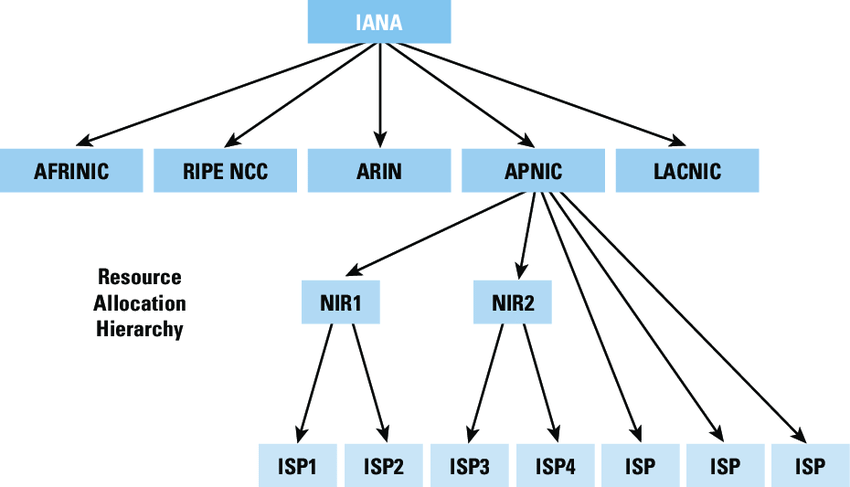
Source: ResearchGate
DNS processName resolution(conversion of human readable domain names into numeric IP addresses) is a hierarchical process
(Not to be confused with the Hierarchy discussed above, IANA manages the DNS root zone which oversees the
absolute top level of the internet's DNS hierarchy).
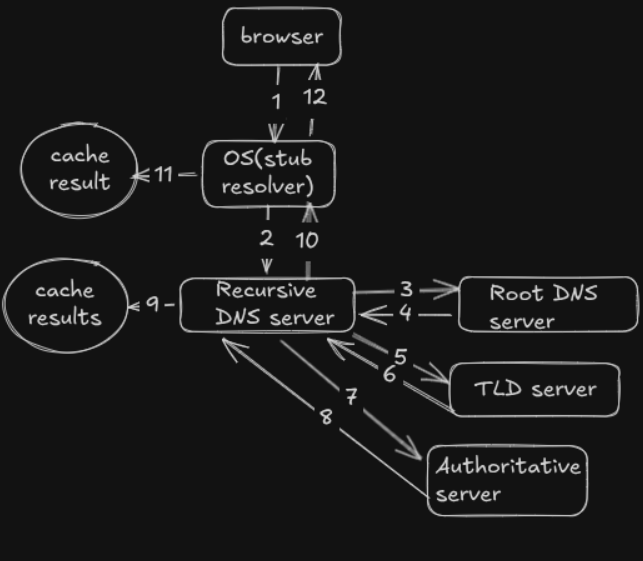
The following steps are taken during name resolution process:
- The browser checks its cache and sees whether it has the ip address of the domain stored. If yes then process stops here.
- If browser cache misses then the browser contacts the OS, specifically the 'stub resolver' .The OS keeps its own independent cache. This cache is maintained through system resolver(eg systemd-resolved on Linux, the DNS client service on windows or mDNSREsponder/discoveryd on macOS). If cache hit, the answer is given to the browser and the process stops here
- If the OS cache misses, then the stub resolver sends the request to the configured recursive DNS resolver server.
This DNS server is configured within the OS. To check which recurive server you are using run
resolvectl statusin the terminal in Linux. If the recursive DNS server has the address cached it will return the address back to the OS which then returns the address back to the browser. The resolution process ends here if cache hit in the recursive server. - If the recursive server cache misses then it starts a series of queries to various levels of the DNS server chain. First it sends a query to the 'root server' asking, "who holds the record of this top level domain(for example for a site called example.com, .com is known as top level domain(TLD), the Recursive server asks the root server "who holds information about sites having .com TLD")"
- Root nameserver The recursive resolver has a hardcoded list of 13 root server addresses (labeled A through M). These aren't 13 machines, they're 13 logical clusters backed by ~1,800 physical nodes worldwide via anycast. The root doesn't know where example.com is. It only knows which servers are responsible for the .com TLD, and it returns those addresses.
- TLD nameserver The TLD server for .com is operated by Verisign. It doesn't know the IP of example.com either, but it does know which authoritative nameservers are registered for example.com, this is set when a domain is registered with a registrar. It returns those nameserver hostnames (e.g. ns1.exampledns.com).
- Authoritative nameserver This is the final stop. The authoritative NS is managed by whoever the domain owner chose as their DNS provider (Cloudflare, AWS Route 53, etc.). It holds the actual DNS records like the A record with the real IP address. It sends this back to the recursive resolver.
- Answer propagates back. The recursive resolver caches the answer for the duration of the record's TTL (Time to Live), set by the domain owner this could be 60 seconds or could be 24 hours. It passes the IP back to the OS, which passes it back to the browser, and DNS is done.
The browser can now open a TCP connection and begin the HTTP request.
NOTE: IANA is responsible for distributing the master file to the 13 logical root server operators worldwide. The master file is a file that contains the addresses of all TLDs like .com,.org and also country codes like .np, .uk etc.
 AWS Route 53 for DNS Server
The first AWS service we will look at is the Route 53 service which can be used as Authoritative DNS server (it can also be used as Recursive DNS server within a Virtual Private Cloud(VPC)). Moreover Route53 also provides Domain name registration and health check services.
What Route 53 does as an Authoritative Server
- Answering Queries: Giving definitive answers to recursive resolvers about your domain's resources.
- Routing Policies: Using advanced logic (like Latency, Geolocation, or Failover routing) to decide which IP address to return to the user based on where they are or how healthy your servers are. This means if you have multiple servers hosting your site, you can configure Route53 to automatically send the grograpically closest or least latent server's ip address as the answer to the DNS query.
- Global Availability: Using a global network of Anycast servers to ensure that whichever authoritative server is closest to the user answers the query as fast as possible.
Anycast and the beauty of BGP
The last point mentioned above says Route 53 ues 'Global network of anycast servers and the authoritative server closest to the user answers the query'. Think about this for a while. How does my recursive server know which of the thousands of server is closest to the client? This is where two important technologies; anycast IP address and BGP come into play.
Anycastis a network addressing method where multiple servers share the same IP address and the network
automatically routes your request to the nearest(or best path) one.
When your recurive server asks the TLD server 'who has ip of example.com?', the TLD server returns Route 53's anycast address.
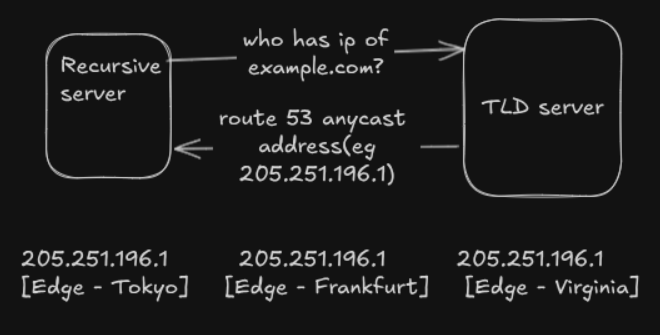 In the example I assumed the anycast address is 205.251.196.1 and edge locations are Tokyo, Frankfurt and Virginia.
Before moving on we need to understand a small concept of Autonomous System(AS). AS is a large independent network
or group of networks managed by a single administrative entty, such as an Internet Service Provider(ISP), university
or Enterprise. It controls its own routing policies and IP addresses and communicates with other AS networks to route traffic across the internet.
Each AS has a unique AS Number(ASN).There are approx 80,000 active AS globally.
For example google llc operated under Autonomous System Number 'AS15169'.
Border Gateway Protocol(BGP) is the routing protocol that connects these Autonomous Systems together
by routing traffic among AS.BGP tracks exactly which AS networks a data packet must
travel through to reach its destination, which helps it prevent routing loops.
Each AS connects to neighboring ASes with a TCP/IP connection for the purpose of sharing routing information. Using this information,
each AS is equipped to properly route outbound data transmissions coming from within.
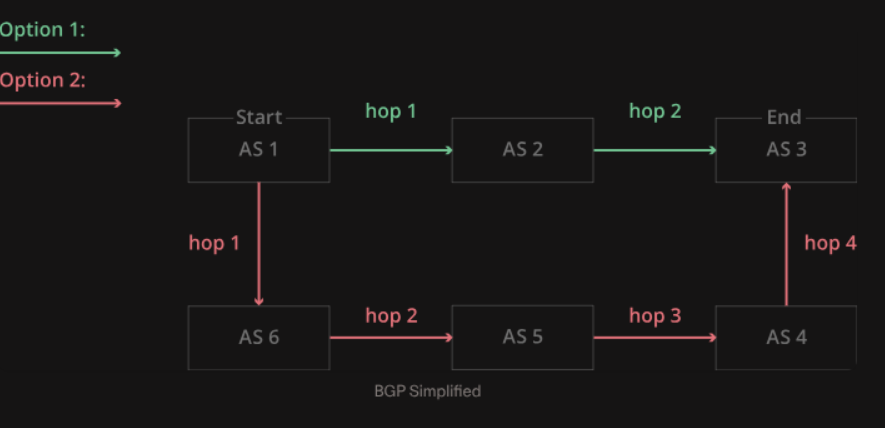 source:cloudfare
As we can see BGP figures out the number of 'hops' to get from source to destination from different routes. I will not
be discussing how BGP does this in this article.
Now getting back to Route 53. The recursive DNS server now has the route 53's anycast address wich is 205.251.196.1.
Now it needs to actually route a packet to that IP. This is where BGP takes over.
Route 53 announces the same IP prefix (205.251.192.0/21) from every one of its ~100+ edge locations simultaneously via BGP:
Tokyo edge → BGP announces 205.251.192.0/21 to peers
Frankfurt edge → BGP announces 205.251.192.0/21 to peers
Virginia edge → BGP announces 205.251.192.0/21 to peers
The recursive resolver's ISP has a BGP routing table that has received all of these announcements. It picks the best path using BGP's decision process, shortest AS path wins, which in practice means the geographically nearest Route 53 edge. So the packet doesn't travel to a single Route 53 datacenter somewhere, it travels to whichever edge is closest to the resolver, not the user.
I recommend you spend some time to understand this concept as most people overlook this completely but this is actually very important concept to grasp.
Packet Creation and the Internet Stack
Before reading this section
Before reading this further I would suggest you understand what the network stack is, that is tcp,udp and ip. Understand
what TCP handshake is and if you are interested in systems programming then understand just the basic syntax of C function.
Finally understand what memory buffer is and a very very very basic idea of pointer.
After DNS resolution our browser now has the IP address of example.com, now what's the next move?
The broswer now needs a way to communicate with the Network Stack of the Operating System. If you don't
know what a network stack is, pause here and learn about the OSI and TCP/IP stack.
If you are really interested in this I highly recommend you check out Computer Network book by
Andrew Tanenbaum. If you just want a quick overview, refer to the article here
To communicate with the stack the browser needs to communicate with the kernel(this is where the trasport and network layers live)
As we know whenever applications need to talk to the kernel it uses syscalls. What the brower want to tell to the kernel is,
"I have created a http message(or any other protocol message but I will give example of http message),
and I want you to establish a connection the server
who has an IP address of x.y.z.w(which the browser knows by doing the DNS lookup) and send this message and receive the reply given by the server and transfer the reply back to me,
I want you to use TCP(or UDP) protocol, and I want you to use IPv4(or IPV6) addressing". All of this is done by using POSIX sockets
The basics of POSIX socket from the client side are as follows(we will get to server side later):
- socket creation: Think of socket as an endpoint that the kernel maintains to enable data communication. This is a C structure. But the beauty of socket is the abstraction it provides.
If you don't understand C or kernel it doesnot really matter. Think of socket as a file that you open whenever you want to communicate with other computer in the internet.
This file contains information like the the domain, which is the addressing scheme(IPv4, IPv6 or local), the socket type(TCP or UDP)
and a bound address(local ip address + port number). Also whatever the browser wants to send to the server(http request message in this case) is also writtern to the socket
and whatever the server sends(http response) is read from here as well. Socket being file is not a mere analogy, it is a UNIX principle that "everything is a file".
To create this socket the browser uses the socket() sys call which has the signature:
socket(domain, type, protocol)
,
the kernel then returns a file discriptor which is basically like a 'ticket' the
the browser can use to refer to the socket.
'socket' sys call creates a socket and tells the kernel which communication type(TCP or UDP) and which domain(IPv4 or IPv6) to use.
Actual port number and IP address values are not yet given to the kernel.
- Connecting to the server: After creation of socket, the browser makes
connect(int sockfd, const struct sockaddr *addr, socklen_t addrlen) sys call.
For those interested in systems programming the meaning of parameters of the connet funtion are;
- sockfd->File descriptor
- addr->Pointer to structure that contains target address and target port
- addrlen-> Size of structure measured in bytes
Using this connect() syscall the browser gives the kernel the target ip address and the target port number. The kernel automatically assigns a local IP(the source IP)
and an ephemeral port(temporary, short-lived port that the kernel automatically assigns to the client side of a connection.) at this point.
The connect sys call triggers the TCP handshake.
- Sending the http message: Now finally to send the message the browser uses
send(int sockfd, const void *buf, size_t len, int flags); sys call.
The broswer keeps the http message in a memory buffer and tells the kernel "The message I want to send is in this location(the function parameter *buf holds the memory of the buffer)."
After the send() call the network stack gets to work. The transport layers adds TCP or UDP header to the http message(It doesnot care whether it is http or any other protocol at the application layer,
all protocols are the treated exactly the same so we will refer to the http message as 'data'). Data + transport layer header is called segment.
Then the network layer adds the IPv4 or IPv6 header to the segment. Segment + IP header is called packet. The data link layer then adds a MAC/Ethernet header to form a 'Frame'.
This frame is physically transfered to the network.
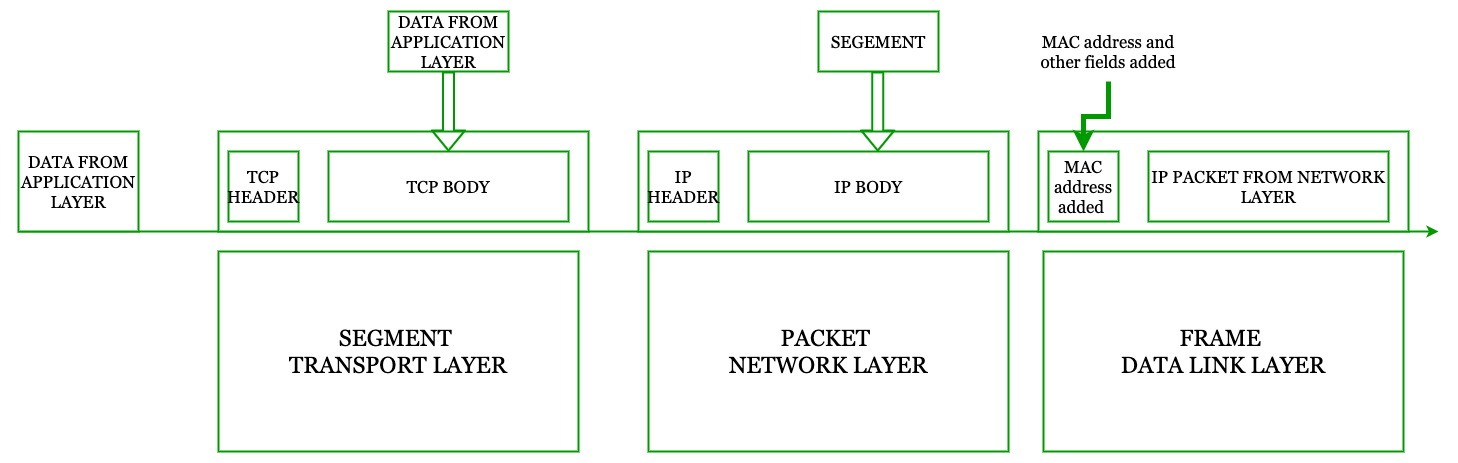
This section might have confused you or you might have thought, "I am here to learn how to design a system, what is all this?". Well I want to track everything that happens when you type in a
url in the browser and get a response and this right is a very important part of that. In the next section we will see how the packet travels from router to router and reaches the target. Our 'targe'
will be a http server . We will then focus on this server whose static frontend is in s3 bucket and the dynamic app is behind an API gateway and load balancer(We will see why as well). We will then
see how this server uses caching using CDN(AWS cloudfront) and we will see how to scale and secure this server.
Packet's Journey And The Destination
Before reading this further I would suggest you understand what the network stack is, that is tcp,udp and ip. Understand what TCP handshake is and if you are interested in systems programming then understand just the basic syntax of C function. Finally understand what memory buffer is and a very very very basic idea of pointer.
After DNS resolution our browser now has the IP address of example.com, now what's the next move? The broswer now needs a way to communicate with the Network Stack of the Operating System. If you don't know what a network stack is, pause here and learn about the OSI and TCP/IP stack. If you are really interested in this I highly recommend you check out Computer Network book by Andrew Tanenbaum. If you just want a quick overview, refer to the article here
To communicate with the stack the browser needs to communicate with the kernel(this is where the trasport and network layers live) As we know whenever applications need to talk to the kernel it uses syscalls. What the brower want to tell to the kernel is, "I have created a http message(or any other protocol message but I will give example of http message), and I want you to establish a connection the server who has an IP address of x.y.z.w(which the browser knows by doing the DNS lookup) and send this message and receive the reply given by the server and transfer the reply back to me, I want you to use TCP(or UDP) protocol, and I want you to use IPv4(or IPV6) addressing". All of this is done by using POSIX sockets
The basics of POSIX socket from the client side are as follows(we will get to server side later):
- socket creation: Think of socket as an endpoint that the kernel maintains to enable data communication. This is a C structure. But the beauty of socket is the abstraction it provides.
If you don't understand C or kernel it doesnot really matter. Think of socket as a file that you open whenever you want to communicate with other computer in the internet.
This file contains information like the the domain, which is the addressing scheme(IPv4, IPv6 or local), the socket type(TCP or UDP)
and a bound address(local ip address + port number). Also whatever the browser wants to send to the server(http request message in this case) is also writtern to the socket
and whatever the server sends(http response) is read from here as well. Socket being file is not a mere analogy, it is a UNIX principle that "everything is a file".
To create this socket the browser uses the socket() sys call which has the signature:
socket(domain, type, protocol)
, the kernel then returns a file discriptor which is basically like a 'ticket' the the browser can use to refer to the socket.
'socket' sys call creates a socket and tells the kernel which communication type(TCP or UDP) and which domain(IPv4 or IPv6) to use. Actual port number and IP address values are not yet given to the kernel. - Connecting to the server: After creation of socket, the browser makes
connect(int sockfd, const struct sockaddr *addr, socklen_t addrlen)sys call. For those interested in systems programming the meaning of parameters of the connet funtion are;- sockfd->File descriptor
- addr->Pointer to structure that contains target address and target port
- addrlen-> Size of structure measured in bytes
connect()syscall the browser gives the kernel the target ip address and the target port number. The kernel automatically assigns a local IP(the source IP) and an ephemeral port(temporary, short-lived port that the kernel automatically assigns to the client side of a connection.) at this point.
The connect sys call triggers the TCP handshake. - Sending the http message: Now finally to send the message the browser uses
send(int sockfd, const void *buf, size_t len, int flags);sys call. The broswer keeps the http message in a memory buffer and tells the kernel "The message I want to send is in this location(the function parameter *buf holds the memory of the buffer)."
After the send() call the network stack gets to work. The transport layers adds TCP or UDP header to the http message(It doesnot care whether it is http or any other protocol at the application layer,
all protocols are the treated exactly the same so we will refer to the http message as 'data'). Data + transport layer header is called segment.
Then the network layer adds the IPv4 or IPv6 header to the segment. Segment + IP header is called packet. The data link layer then adds a MAC/Ethernet header to form a 'Frame'.
This frame is physically transfered to the network.
This section might have confused you or you might have thought, "I am here to learn how to design a system, what is all this?". Well I want to track everything that happens when you type in a url in the browser and get a response and this right is a very important part of that. In the next section we will see how the packet travels from router to router and reaches the target. Our 'targe' will be a http server . We will then focus on this server whose static frontend is in s3 bucket and the dynamic app is behind an API gateway and load balancer(We will see why as well). We will then see how this server uses caching using CDN(AWS cloudfront) and we will see how to scale and secure this server.
After the DNS resolution, the destination of the data packet is known. For this article, the destination is a web(http) server. Let's assume the http application is made using the three tier architecture(presentation layer, logic layer and the data layer). Why make this assumption? Because three-tier architecture is the most widely used pattern to build web applications. This application is simply a program running on the server. Are all three layers running on the same server machine then? This is the simplest way to do it, run the whole application on a single server and give that server a public IP address so clients can talk to a single machine which is out in the open. The server is public but as we know us clients are in a private network, for this a technology called NAT(Network address translation) comes into play. Let's drift away a bit and discuss about NAT now, we' ll come back to this after NAT.
Network Address Translation(NAT)
NAT is a technology used to translate a private IP address into a public IP address. To connect to a
server on the internet, a public IP address is needed. I'm assuming here that you already know what
private and public IP addresses are, and why private addresses exist in the first place. The public IP
address you end up using is either assigned directly by your ISP, or it belongs to a router somewhere
inside your ISP's network, depending on the type of NAT your ISP uses (more on that shortly). Your router
has two sides: a LAN side, which faces your devices like laptops and phones and always has a private IP
like 192.168.1.1, and a WAN side, which faces your ISP.
In the simplest and most common home setup, your router's WAN side gets a public IP address from your ISP. Every device on your LAN (laptop, phone, smart TV, etc.) gets its own private IP from the router, but none of those private IPs mean anything outside your home network. The internet has no idea they exist. So when your laptop wants to talk to a server out on the internet, the router has to rewrite the packet, replacing your laptop's private IP with the router's own public IP, before sending it out. This way, the server only ever sees one IP address (the router's public one) instead of the private IP of every device behind it.
Of course, this raises a question: if multiple devices on your LAN are all using the same public IP to talk to the internet, how does the router know which reply belongs to which device? This is where port numbers come in. Along with translating the IP address, the router also keeps track of port numbers, and maintains a NAT table to remember which internal device made which request. This specific flavor of NAT, where many private IPs are mapped onto one public IP using ports, is sometimes called NAT overload or PAT (Port Address Translation) and it's what your home router is doing essentially all the time.
Here's a simplified example of what a NAT table might look like inside your router:
| Private IP : Port (LAN side) | Public IP : Port (WAN side) | Destination |
|---|---|---|
| 192.168.1.5 : 51422 | 49.205.x.x : 61001 | 142.250.71.78 : 443 |
| 192.168.1.6 : 49230 | 49.205.x.x : 61002 | 142.250.71.78 : 443 |
| 192.168.1.7 : 33890 | 49.205.x.x : 61003 | 104.18.32.7 : 443 |
Notice how both 192.168.1.5 and 192.168.1.6 share the exact same public IP
(49.205.x.x), but the router assigns each of them a different public-facing port
(61001 and 61002). When a reply comes back addressed to
49.205.x.x : 61001, the router looks up its NAT table, finds that this port maps to
192.168.1.5 : 51422, rewrites the packet accordingly, and forwards it to the right device
on the LAN. This lookup-and-rewrite happens for every single packet, in both directions, completely
invisibly to you as the user.
This is the straightforward case, where your router's WAN interface holds a genuine public IP. But
there's a wrinkle that's become increasingly common: CGNAT (Carrier-Grade NAT). Because
the world is running short on available IPv4 addresses, many ISPs no longer give every customer's router
a true public IP. Instead, your router's WAN side gets a private-looking address (often in the
100.64.0.0/10 range, reserved specifically for this purpose), and the ISP performs its own
additional layer of NAT somewhere further upstream, translating thousands of customers' "private" WAN
addresses down onto a much smaller pool of actual public IPs.
In other words, under CGNAT, there are two NAT layers stacked on top of each other: your own router does
NAT for your home devices, and then the ISP does another round of NAT for your router along with many
other customers, before the traffic finally reaches the public internet. This matters in practice because
it affects things like port forwarding and hosting a server from home if your WAN IP isn't truly public,
forwarding a port on your own router isn't enough, since the ISP's NAT layer is still standing between you
and the internet.
Home router and the ISP's CGNAT router keeps different tables:
| Private IP : port | Router WAN IP : port | |
|---|---|---|
| 192.168.1.5:51422 | → | 100.64.3.21:61001 |
| Router WAN IP : port | Public IP : port | |
|---|---|---|
| 100.64.3.21:61001 | → | 49.205.x.x:33012 |
Now that we understand how NAT gets a private client talking to the public internet, let's come back to our three-tier web application and see how a request from your laptop actually finds its way to the server.
We were discussing about running all three layers in a single computer and giving it a public IP address.
Now this is never done in real life even if the application is designed for a very small scale. Exposing
your server to the public internet makes it a playing ground for attackers. This is a very insecure setup and
it is never ever done.
Even if we host our entire application in a single computer, there is always a reverse proxy infront
of it. This reverse proxy has a public address. The destination address of the data packet is always
the address of this reverse proxy. Before the data packet even reaches the application sever, the
reverse proxy does the following:
IP Masking: It conceals the origin server's real IP address, preventing attackers from
targeting backend infrastructure directly.
DDoS & Threat Mitigation: It absorbs malicious traffic and filters out bots or suspicious
requests before they reach your application.
SSL/TLS Termination: It handles the computationally heavy process of encrypting and
decrypting web traffic, taking this burden off the origin servers.
Compression: It compresses files (like Gzip) before sending them across the internet,
reducing data transfer times.
To see how this kind of setup is configured using Apache http server check out my article
here. In this article I have shown how to run
a similar setup where the application's presentation layer(frontend) is developed in react and the
logic layer is made in Golang and the reverse proxy is Apache. This article actually covers a simpler
version of the setup I am talking about here because in this article the reverse proxy(Apache) is not
in different computer but in the same computer that is running the frontend and the backend. So even
if you have only one server machine to host your app always shield your application from direct exposure
in production.
Reverse proxys can also be configured as load balancers and API gateways which we will see in scaling the sever.