Introduction
Active Directory (AD) is Microsoft's directory service for Windows domain networks. It acts as a centralized database for users, groups, computers, printers, policies, and other network resources. Active Directory securely manages user identities, authenticates users, and authorizes access to resources across a network.
Without Active Directory, system administrators would need to manually manage user accounts, permissions, and configurations on each individual computer. With Active Directory, administration becomes centralized. Administrators can create users, organize them into groups, assign permissions to groups, enforce security policies, manage devices, and control access to network resources from a single location.
Architecture Overview
Many people think that using Active Directory Domain Services (AD DS) means you can only work within the Windows ecosystem. This is not true at all. Linux systems, macOS devices, printers, NAS devices, and many enterprise applications can integrate with Active Directory.
To understand this properly, we need to understand the major technologies and protocols that make up Active Directory.
You can think of Active Directory as an interconnection of several important components and protocols:
- Kerberos — Authentication protocol
- LDAP — Directory access and querying protocol
- DNS — Service discovery and domain location
- Extensible Storage Engine (ESE) — Database engine
- Group Policy — Centralized configuration management
1. Kerberos Authentication
Kerberos is the primary authentication protocol used by Active Directory. It provides secure authentication without sending passwords directly over the network.
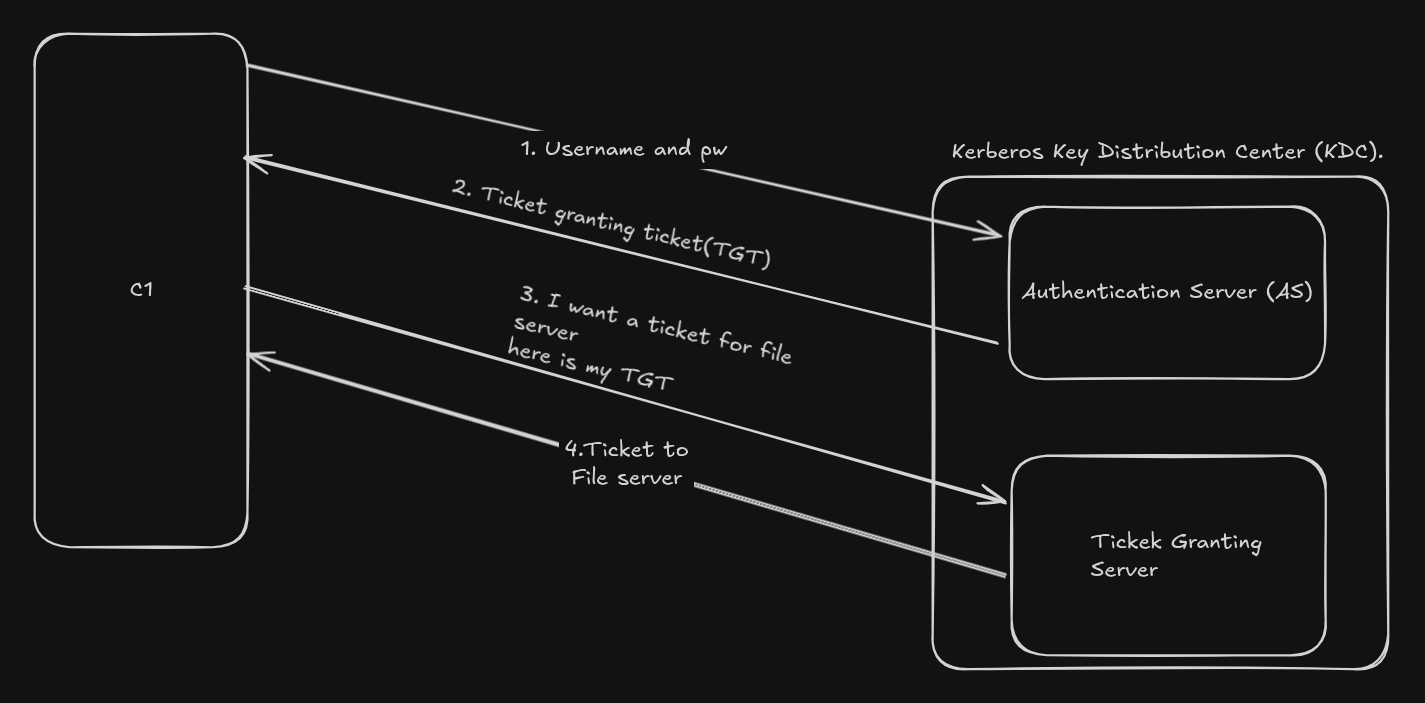
NOTE: Domain Controller acts as the Kerberos Key Distribution Center (KDC)
When a user logs into a domain-joined computer, the following simplified process occurs:
- The user enters their username and password.
- The client contacts the Domain Controller (DC).
- The Domain Controller verifies the credentials.
- The DC issues a Ticket Granting Ticket (TGT).
- The user can then request service tickets to access resources such as file servers, printers, or applications.
This ticket-based system provides both security and scalability.
Linux systems can also integrate with Kerberos authentication using tools
such as SSSD, Winbind, or realmd.
Kerberos uses a trusted authentication service known as Key Distribution centre
It acts as the central authority that verifies identities and issues tickets
that allow users and services to communicate securely without repeatedly transmitting
passwords across the network. In Active Directory environments, the Domain Controller
typically functions as the KDC.
2. LDAP (Lightweight Directory Access Protocol)
LDAP is the protocol used to query and interact with the Active Directory database.
Applications and administrators use LDAP to:
- Search for users and groups
- Retrieve directory information
- Modify objects
- Authenticate users
- Organize resources
For example, when you search for a user in Active Directory Users and Computers, the tool communicates with AD using LDAP queries.
LDAP is platform-independent, which is why Linux applications, web applications, VPN servers, Jenkins, GitLab, and many enterprise tools can authenticate users against Active Directory.
3. DNS (Domain Name System)
DNS is one of the most important parts of Active Directory and is often overlooked by beginners.
Active Directory heavily depends on DNS to locate Domain Controllers and services. When a client wants to log into a domain, it first uses DNS to find the appropriate Domain Controller.
Without properly configured DNS, Active Directory authentication and domain services will fail.
Active Directory commonly uses SRV records in DNS to advertise services such as:
- Kerberos authentication services
- LDAP directory services
- Global Catalog services
4. Extensible Storage Engine (ESE)
The Active Directory database itself is stored inside the file:
NTDS.dit
This database uses Microsoft's Extensible Storage Engine (ESE), sometimes called JET Blue.
The database stores:
- User accounts
- Passwords (hashed)
- Group memberships
- Computer objects
- Security policies
- Organizational Units (OUs)
Domain Controllers continuously replicate this database between each other to maintain consistency across the environment.
5. Group Policy
Group Policy allows administrators to centrally manage and configure computers and users in the domain.
Using Group Policy, administrators can:
- Enforce password policies
- Disable USB devices
- Deploy software
- Configure firewalls
- Map network drives
- Run startup scripts
- Apply security baselines
This is one of the most powerful features of Active Directory because it enables large scale administration and standardization across thousands of systems.
6. Domain Controller
A Domain Controller (DC) is a server that runs Active Directory Domain Services. It stores a copy of the Active Directory database and responds to authentication requests from users and computers.
A Domain Controller is responsible for:
- User authentication
- Authorization
- Policy enforcement
- Directory queries
- Replication
In enterprise environments, multiple Domain Controllers are usually deployed for redundancy and high availability.
7. Organizational Units (OUs)
Organizational Units (OUs) are containers used to organize objects inside Active Directory.
For example:
Company
 ├── Users
 ├── Servers
 ├── HR
 ├── Finance
 └── IT
Administrators can apply different Group Policies to different OUs, allowing fine-grained control over systems and users.
8. Active Directory and Linux
Linux systems can integrate with Active Directory using technologies such as:
- SSSD
- realmd
- Winbind
- Samba
- Kerberos
This allows Linux machines to:
- Join Active Directory domains
- Authenticate users using AD credentials
- Apply centralized access controls
- Use single sign-on (SSO)
This is why Active Directory is widely used even in mixed Windows-Linux enterprise environments.
Domains, Trees & Forests
Active Directory uses a hierarchical structure to organize and manage large enterprise environments. The hierarchy consists of domains, trees, and forests.
1. Domains
A domain is the fundamental administrative boundary in Active Directory. It contains users, groups, computers, policies, and other objects that share a centralized directory database and security policies.
Examples:
corp.example.com
research.example.com
sales.example.com
Each domain has at least one Domain Controller responsible for authentication, authorization, and replication.
2. Trees
A tree is a collection of multiple domains that share a contiguous namespace. It is a A Domain Tree is a collection of domains grouped together in a hierarchical parent-child structure.
example.com
 ├── sales.example.com
 ├── hr.example.com
 └── research.example.com
Domains inside a tree automatically establish two-way transitive trust relationships with one another.
3. Forests
A forest is the top-level logical structure in Active Directory. A forest can contain multiple trees that may or may not share the same namespace.
All domains inside a forest share:
- A common schema
- A global catalog
- Forest-wide trust relationships
NOTE: The Schema is the blueprint that defines what data can exist, while the Global Catalog is a distributed index that helps you find that data across the entire forest.
The forest acts as the primary security boundary in Active Directory.
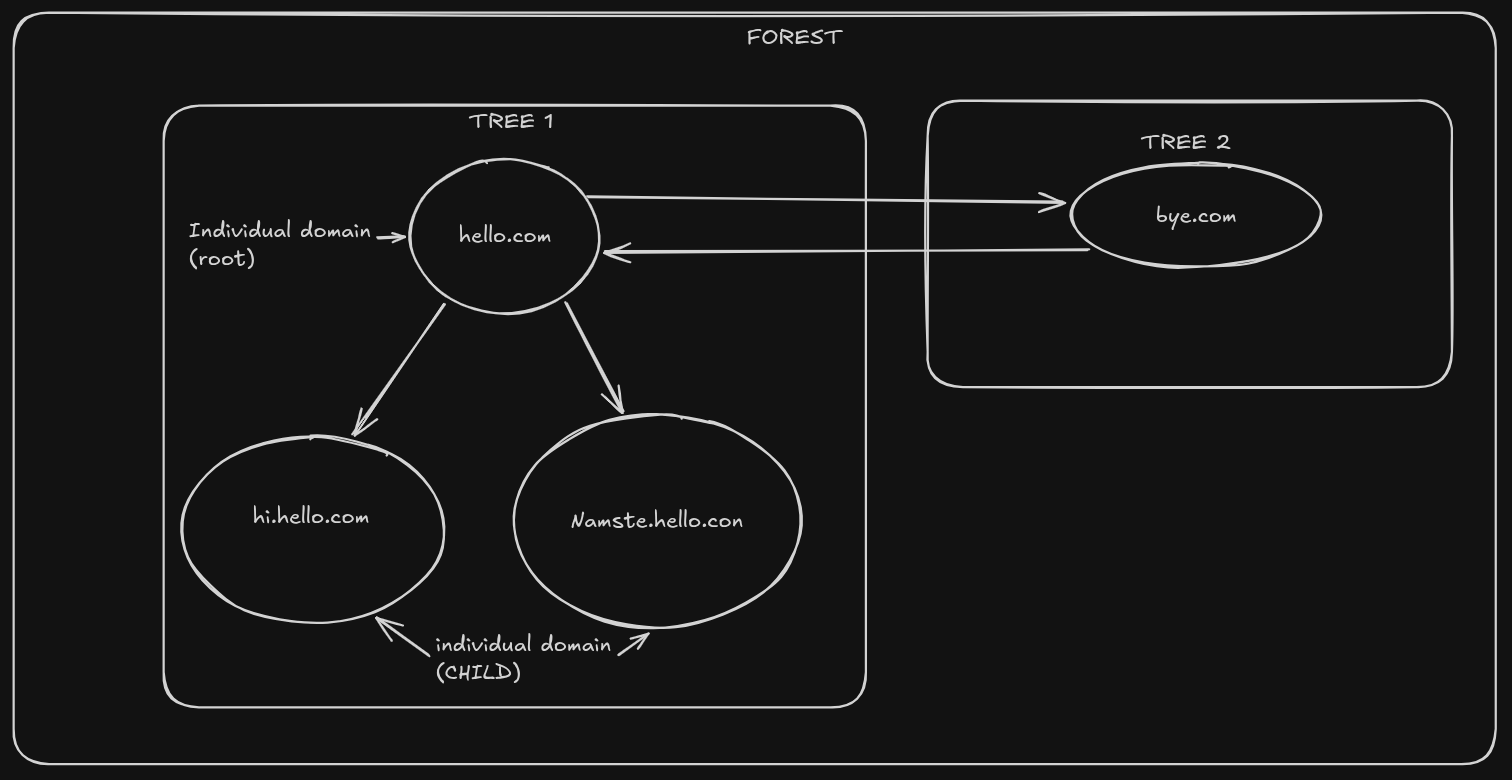
Note that a single domain (bye.com) is also a part of a tree.
4. Trust Relationships
Trusts allow users in one domain to access resources in another domain.
- One-way trust — access flows in one direction
- Two-way trust — both domains trust each other
- Transitive trust — trust extends automatically
- External trust — connects separate forests/domains
- Forest trust — trust between entire forests
AD Objects: Users, Groups & OUs
Everything stored inside Active Directory is represented as an object. Each object contains attributes that describe it.
1. User Accounts
User objects represent identities used for authentication and authorization. These accounts can belong to employees, administrators, applications, or services.
2. Groups
Groups simplify permission management by assigning permissions to groups instead of individual users.
Security Groups
Used to assign permissions to resources.
Distribution Groups
Used primarily for email distribution lists and cannot assign permissions.
Group Scopes
- Domain Local — permissions within a domain
- Global — users from the same domain
- Universal — users across multiple domains
3. Organizational Units (OUs)
OUs are containers used to logically organize objects inside Active Directory.
Company
 ├── Servers
 ├── Workstations
 ├── HR
 ├── Finance
 └── IT
Administrators commonly apply Group Policies to OUs.
4. Computer Objects
Domain-joined systems are represented as computer objects inside AD. These objects allow centralized management and authentication.
5. Service Accounts
Service accounts are accounts used by applications and services to interact with resources securely.
Modern environments commonly use:
- Managed Service Accounts (MSA)
- Group Managed Service Accounts (gMSA)
Group Policy Objects (GPO)
Group Policy Objects (GPOs) provide centralized configuration management for users and computers.
Administrators can configure:
- Password policies
- Firewall rules
- Windows Updates
- USB restrictions
- Security baselines
- Software deployment
1. GPO Processing Order
Policies are applied using LSDOU order:
Local → Site → Domain → Organizational Unit
NOTE:In Active Directory, a Site is a physical boundary based on IP subnets and network connectivity. A Domain is a logical boundary that groups users and computers for central administration, security, and directory database (NTDS.dit) replication
Policies applied later can override earlier settings.
2. Inheritance & Enforcement
Child OUs inherit policies from parent containers unless inheritance is blocked. Administrators can enforce critical policies to prevent overriding.
3. WMI Filtering
WMI filters allow GPOs to target specific operating systems, hardware, or system configurations.
Replication & FSMO Roles
Active Directory uses multi-master replication, meaning multiple Domain Controllers can update the directory database.
1. Replication
Changes made on one Domain Controller replicate to others to maintain consistency.
Replication can occur:
- Within a site
- Between sites
2. Sites & Site Links
Sites represent physical network locations. Site links control replication traffic between locations.
3. KCC (Knowledge Consistency Checker)
The KCC automatically builds replication topologies between Domain Controllers.
4. FSMO Roles
Although AD is multi-master, certain operations are handled by special roles known as FSMO (Flexible Single Master Operations) roles.
- Schema Master — controls schema modifications
- Domain Naming Master — manages domain additions/removals
- RID Master — allocates Relative IDs
- PDC Emulator — time sync, password updates, legacy support
- Infrastructure Master — updates cross-domain references
Authentication: Kerberos & NTLM
1. Kerberos
Kerberos is the default authentication protocol in modern Active Directory environments.
Kerberos authentication flow:
- User authenticates to the Authentication Server (AS)
- The AS issues a Ticket Granting Ticket (TGT)
- The client sends the TGT to the Ticket Granting Server (TGS)
- The TGS issues service tickets
- The user accesses network services securely
The Key Distribution Center (KDC) running on the Domain Controller contains both the AS and TGS components.
2. NTLM
NTLM is an older Microsoft authentication protocol still used for compatibility.
Unlike Kerberos, NTLM relies on challenge-response authentication and does not support modern delegation and mutual authentication features.
Because NTLM is more vulnerable to attacks such as relay attacks and pass-the-hash attacks, organizations are encouraged to minimize or disable it.
3. SPNs & Delegation
Service Principal Names (SPNs) uniquely identify services in Kerberos. Improper SPN configuration can lead to authentication failures or attacks such as Kerberoasting.
Hardening & Security Considerations
Because Active Directory controls authentication and authorization across an enterprise, compromising AD often means compromising the entire organization.
4. Security Best Practices
- Implement least privilege access
- Use separate admin accounts
- Enable MFA for privileged users
- Use tiered administration
- Disable NTLMv1
- Enable SMB signing
- Use LDAPS instead of plain LDAP
- Rotate local admin passwords using LAPS
- Enable auditing and centralized logging
5. Protected Users Group
The Protected Users group provides additional protections for privileged accounts by disabling weaker authentication mechanisms.
6. Credential Guard
Credential Guard isolates sensitive credentials using virtualization-based security to reduce credential theft.
Common Attacks & Mitigations
1. Pass-the-Hash
Attackers steal NTLM password hashes and reuse them for authentication without knowing the actual password.
Mitigation:
- Use Credential Guard
- Restrict lateral movement
- Disable NTLM where possible
2. Kerberoasting
Attackers request Kerberos service tickets associated with SPNs and attempt offline password cracking.
Mitigation:
- Use strong service account passwords
- Use gMSAs
- Monitor abnormal ticket requests
3. AS-REP Roasting
Targets accounts with Kerberos preauthentication disabled.
4. DCSync
Attackers simulate Domain Controller replication to extract password hashes.
Mitigation:
- Restrict replication permissions
- Monitor replication requests
5. Golden Ticket
Attackers forge Kerberos TGTs using the KRBTGT account hash.
Mitigation:
- Protect Domain Controllers
- Rotate KRBTGT passwords after compromise
6. BloodHound
BloodHound maps Active Directory relationships and attack paths to identify privilege escalation opportunities.
Useful Tools & Commands
1. Windows Administrative Tools
- Active Directory Users and Computers (ADUC)
- Group Policy Management Console (GPMC)
- Active Directory Administrative Center
- RSAT Tools
2. PowerShell Commands
Get-ADUser -Filter *
Get-ADGroupMember "Domain Admins"
Get-ADComputer -Filter *
3. Diagnostic Tools
dcdiag
repadmin /replsummary
nltest /dclist:domain.local
4. Linux LDAP Queries
ldapsearch -x -H ldap://dc.domain.local
5. Security Assessment Tools
- BloodHound
- SharpHound
- PingCastle
- Mimikatz
A Simple Use Case: Software Installation
Creating Organizational Units
Let's say you have 100 computers in an organization and a software needs to be installed on every one of them. What do you do
as a system administrator? Of course you don't go to each and every one of those computers to install the software. Making
the computer owners install the software is also not a good idea. This is one of the use cases of Active DIrectory; you can
silently mass install sofwares on the domain member computers.
Before doing this lab, you need to have a basic Active Directory setup in place. To see a quick video to install and
run active directory, check this Setup AD DS. To see my setup
and how to join a Windows computer to the domain,
go here and read the first part of the article. Afer you have setup
your Domain and joined a Windows computer to it, let's see how to push software installation and through this I will also teach you
things about Organizational Units, Group Policy, Saring resources and granting permissions.
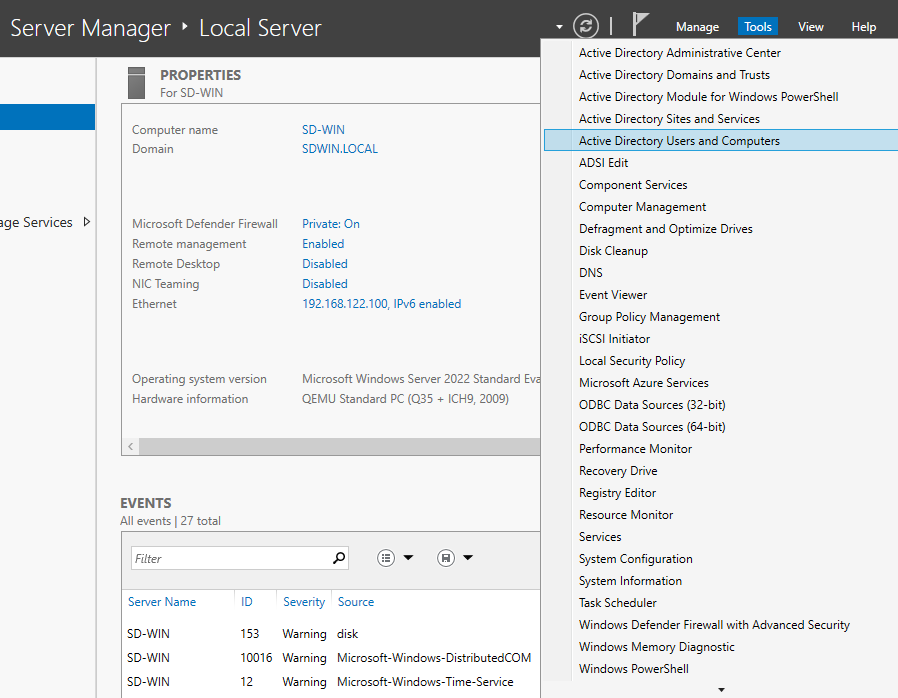
After joining the Windows computer to the domain, in the server manager click Tools->Active Directory Users and Computers.
 Within your domain(SDWINS.LOCAL in my case), you will see a container named 'Computers'.
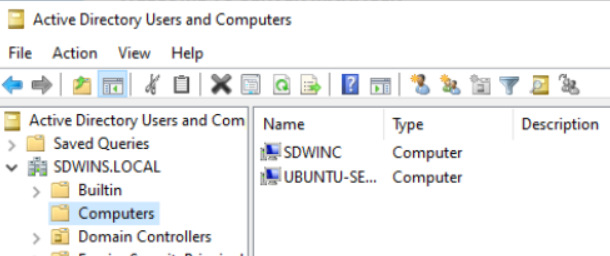
'SDWINC' is my Windows computer. Now let's assume that this company has a branch in Nepal, this 'SDWINC' is a computer of this Nepal branch. How do we organize this sort of thing? We use 'Organizational Units'. To create a Organizational Unit,
- Open Active Directory Users and Computers.
- Right-click your domain name in the left navigation pane.
- Hover over New and select Organizational Unit.Name the new OU (e.g., "Nepal Branch") and click OK.
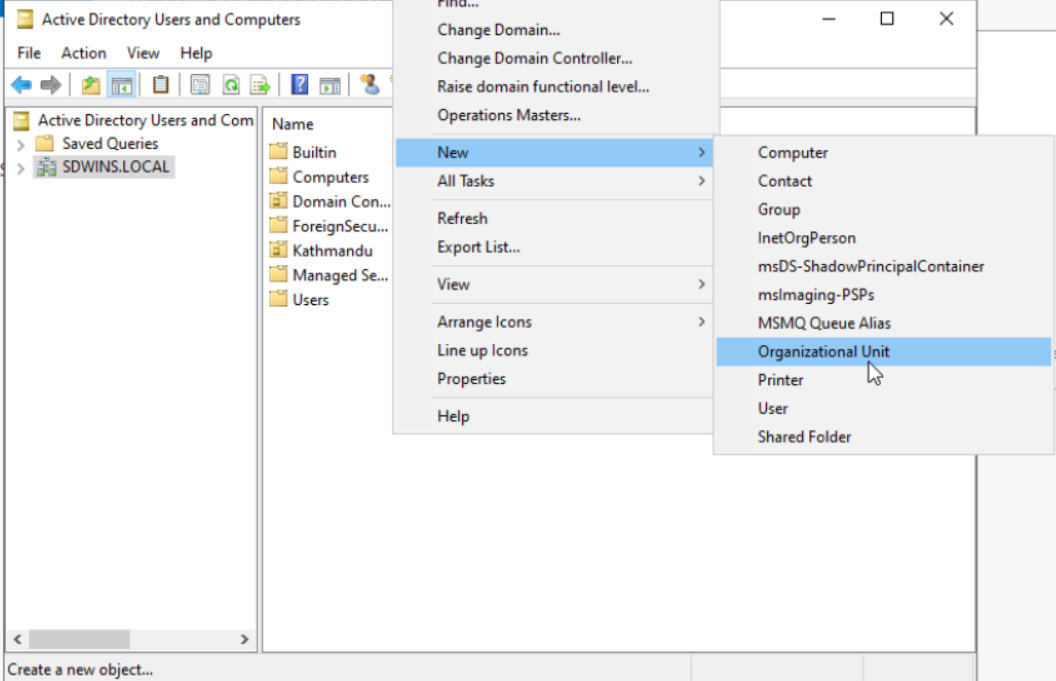
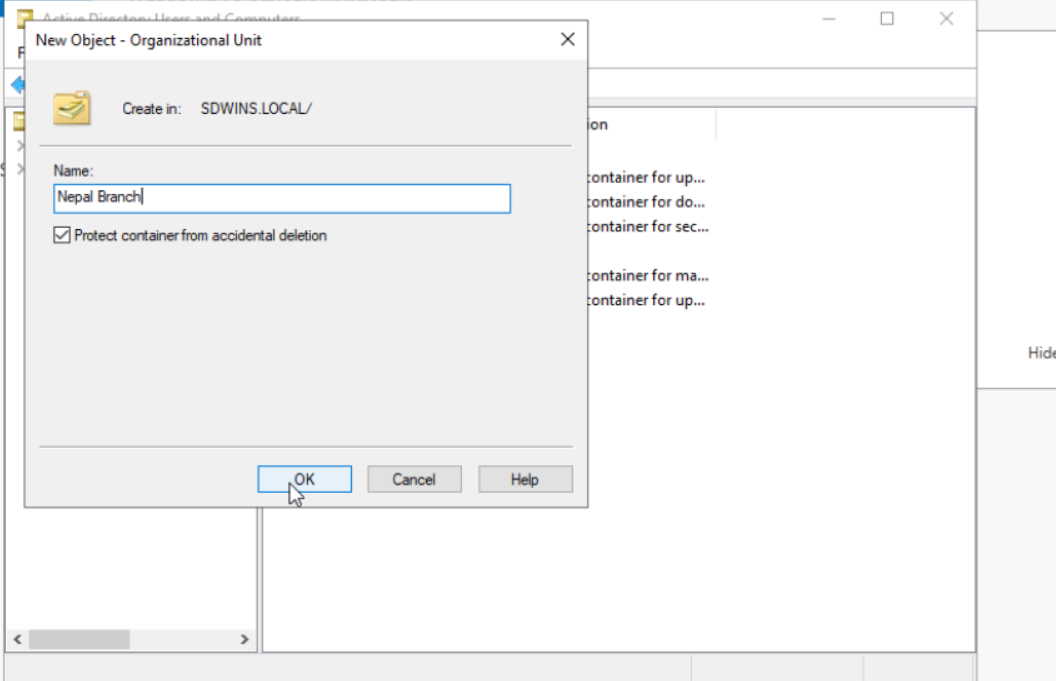
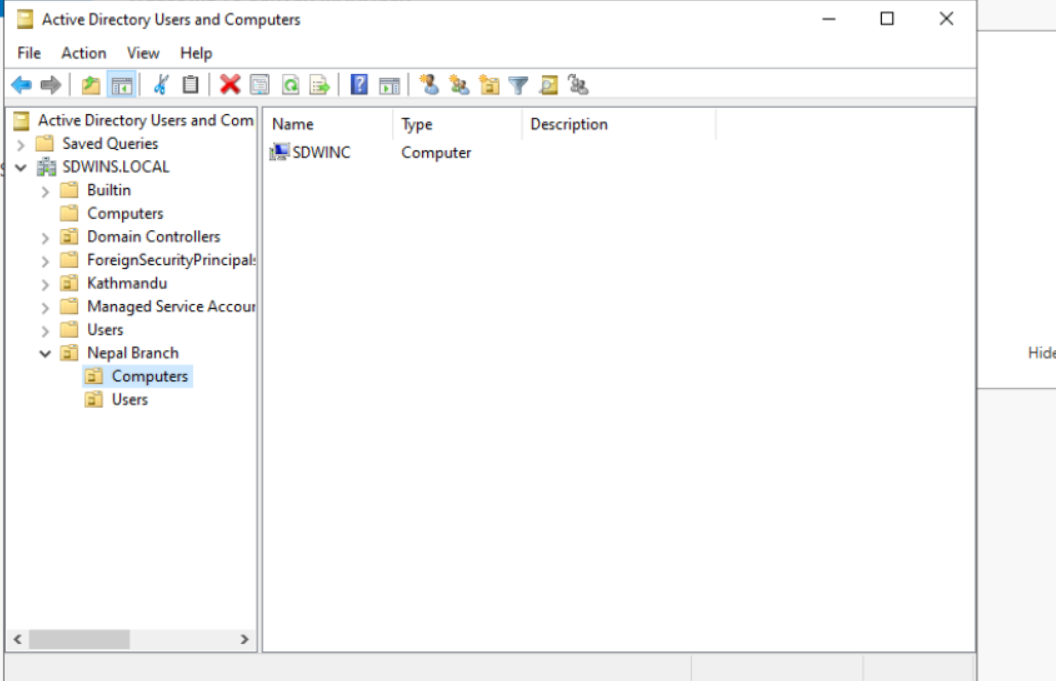
Now inside this 'Nepal Branch' OU I will create 2 more OUs called 'Computers' and 'Users'. To do this right click 'Nepal Branch' on the left navigation pane, hover over new and select Organizational Unit and name it Computers and Users respectively. This is a common way to organize this type of setup. All the Compuers of the Nepal branch will be placed in 'Nepal Branch->Computers' OU To do this simply drag the computer object from the default Computers container and drop it in 'Nepal Branch->Computers'. SDWINC computer is now inside Nepal Branch's Computers OU.
Silent Sofware Installation to Domain Computers
Now let's say I need to install a software(example 7zip) to all the computers in the Nepal Branch. Let's see how to do this. I will take 7Zip as an example. To do this we will need msi installer. Download the msi installer for 7Zip from here. Download the .msi installer not .exe. Now make a folder called 'Deployment' and place this installer there in your Domain Controller. Now follow these steps:
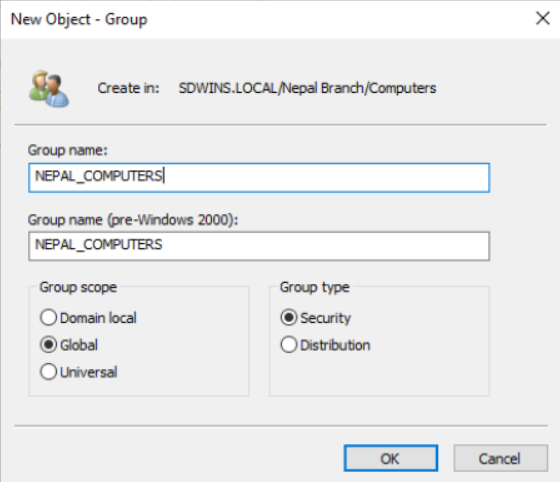
- Make a group in the Nepal Branch OU. For mass installation, we must make a group, we cannot use OUs directly. To do this
Right-click on the 'Computers' OU inside 'Nepal Branch' OU, hover to new and select Group. Name the group 'NEPAL_COMPUTERS' or
something meaningful like this.
- Now right click on the 'Deployment' folder. Go to 'Properties'->Sharing->Advanced Sharing and check Share this folder.
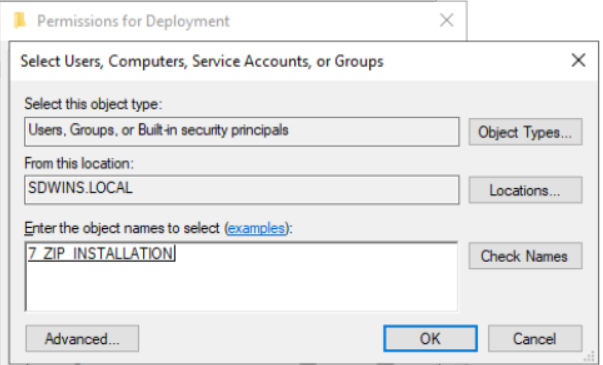
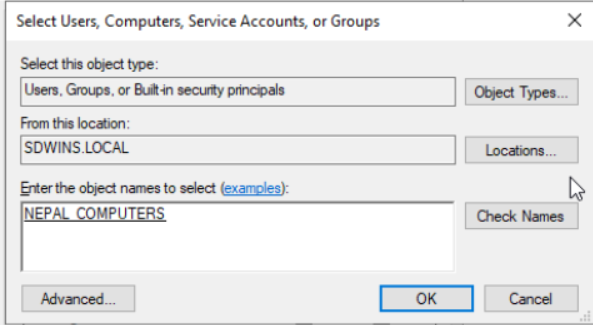
- Click 'Permissions'->Add. In the box write 'NEPAL_COMPUTERS' and click 'Check Names'. Click Ok and then tick the 'Read' permission
in the Permissions section(Which is already ticked by default) and click Apply.
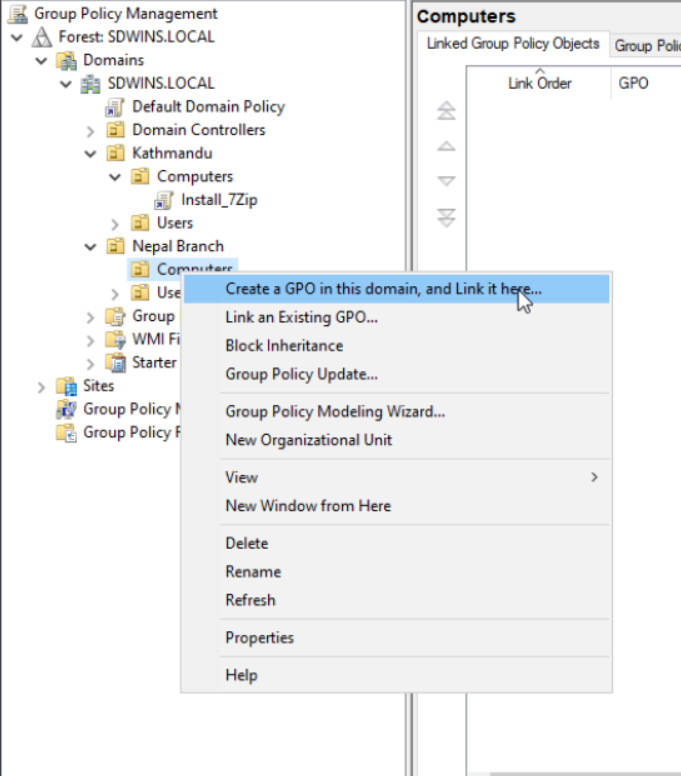
- Now go to Group Policy Management Dahboard in you Domain Controller. To do this go to Run(Windows + R) and type in GPMC.msc.
Then right click on 'Computers' OU of the 'Nepal Branch' OU and click 'Create a GPO in this domain, and Link it here...'. Name
it '7ZIP_INSTALLATION' or something meaningful like this.
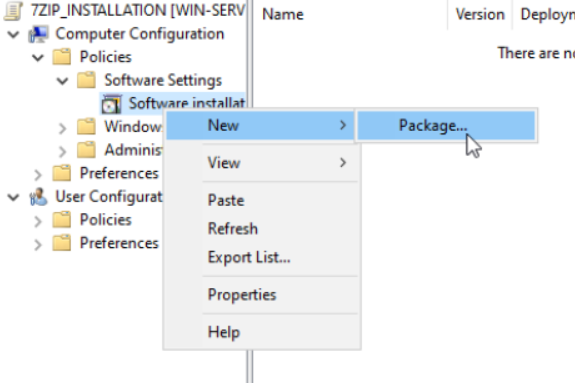
- Now right click on this '7ZIP_INSTALLATION' GPO and click edit. Then navigate to 'Policies'->'Software Settings'. Right click on
Software installtion-> Hover over New and select package
- In the file name you need to give the Universal Naming Convention(UNC) path of the 'Deployments' Folder. To know this path
right click on Deployments folder->Properties->Sharing. The UNC path will be written under 'Network Path'.
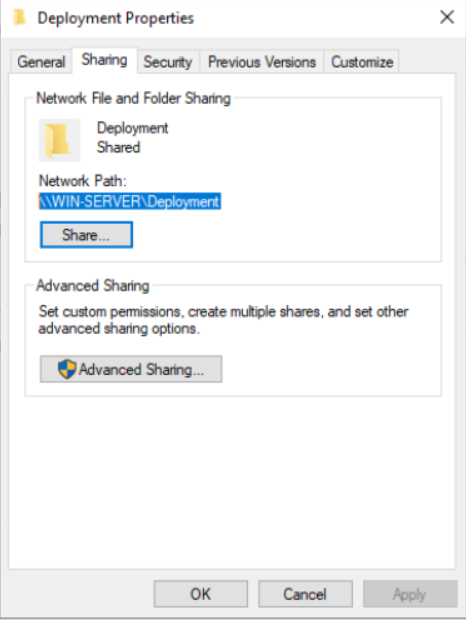
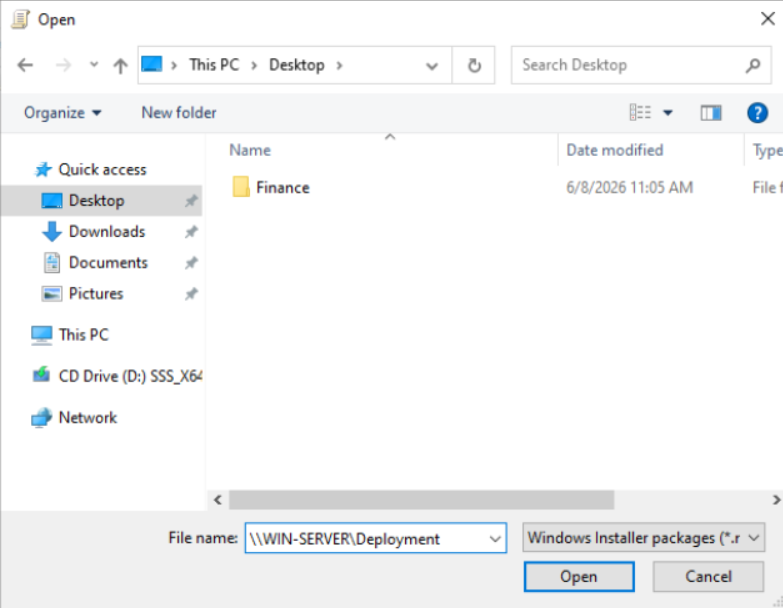
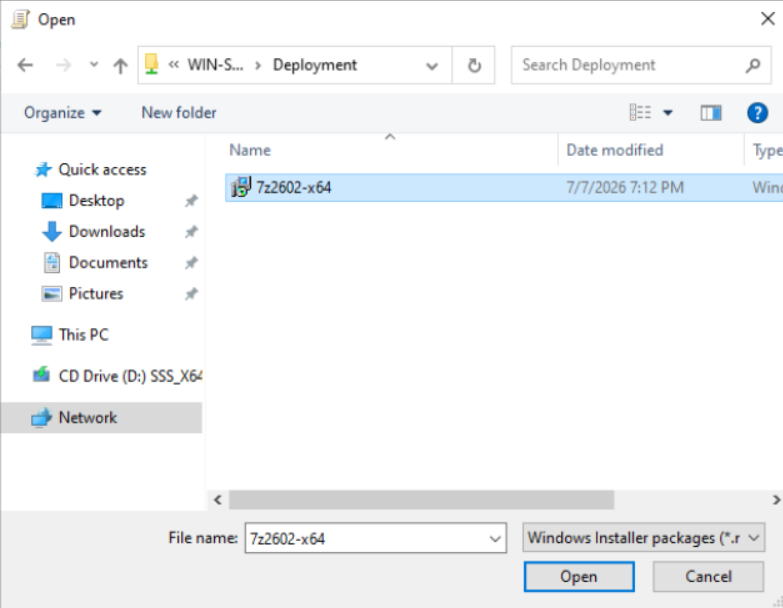
- Check Assigned and click 'OK'.
Now Restart your Windows computer(SDWINC)
7ZIP should automatically be installed after restart.
Before Retart:
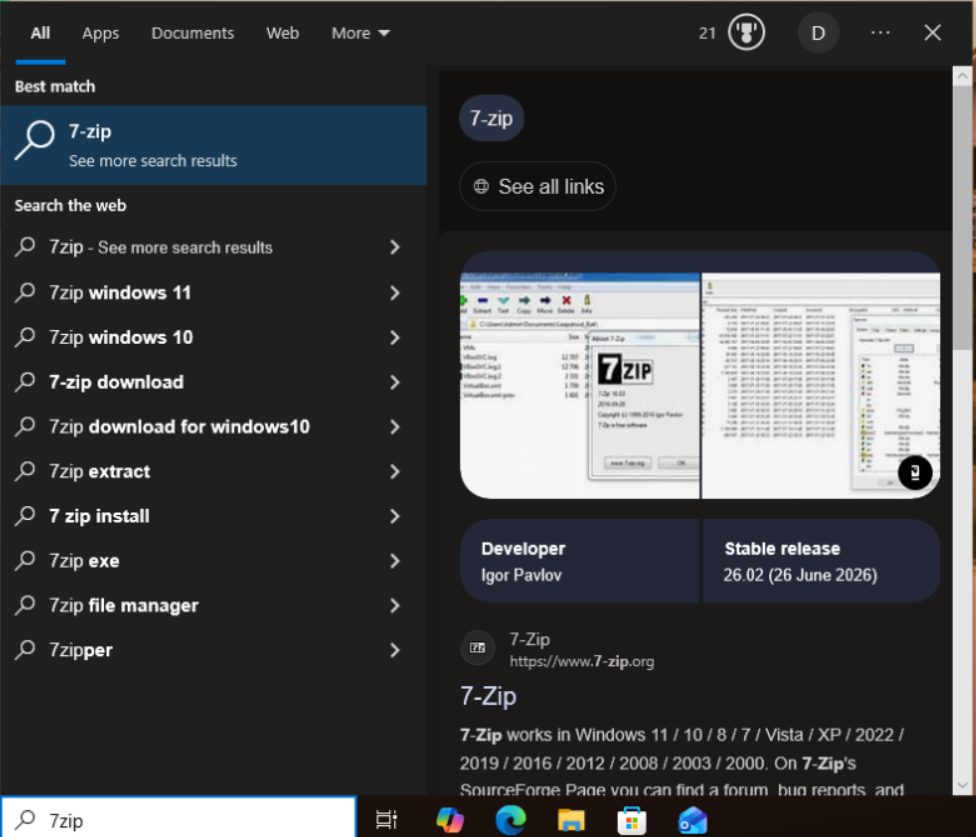
After Restart:
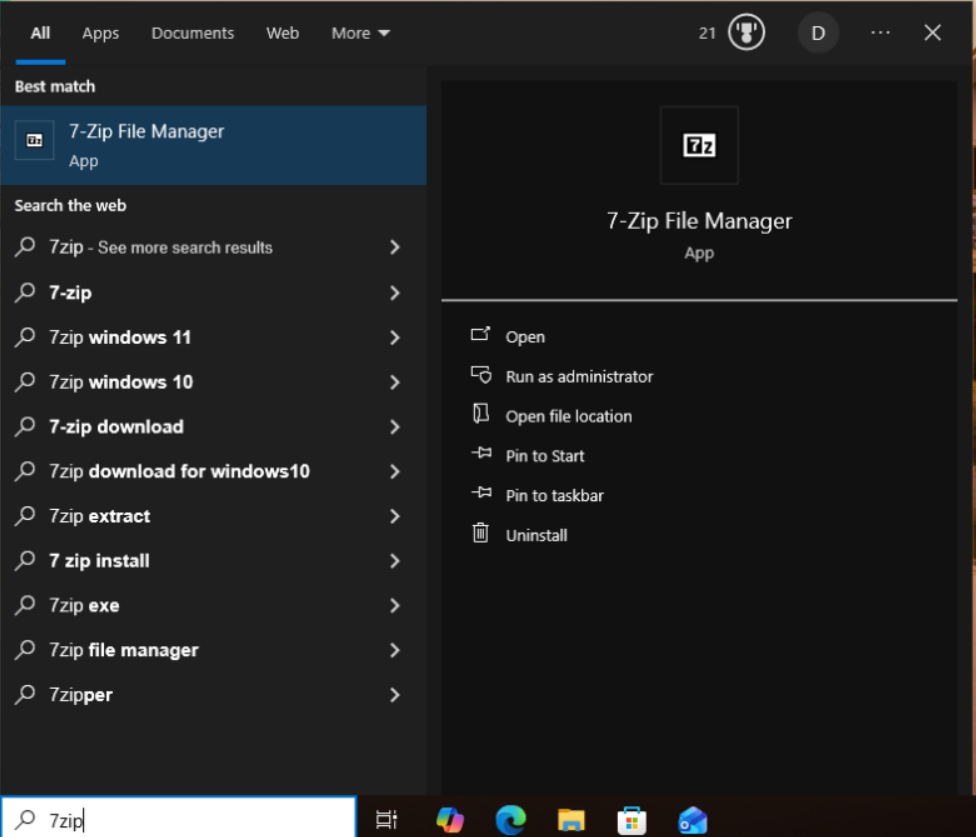
As you can see 7 zip is installed after restarting. In this way you can mass deployy any software packages to AD member computers.
Conclusion
Active Directory is one of the most important identity management systems in modern enterprise infrastructure. Understanding its architecture, authentication mechanisms, administrative model, and security weaknesses is essential for system administrators, security engineers, penetration testers, and DevOps professionals.
A properly designed and secured Active Directory environment provides scalable
centralized identity management, while a poorly secured one can become the
single point of compromise for an entire organization.
To see how to setup this in your server click the link below:
Setup AD DS
To see how to connect windows and linux clients to the domain and also setup ubuntu as a samba file system click here
Frequently Asked Questions
What is an Active Directory home lab?
An Active Directory home lab is a test environment used to learn Windows Server administration, domain management, authentication, group policies, and security concepts.
Can Ubuntu join an Active Directory domain?
Yes. Ubuntu can join an Active Directory domain using Samba, Kerberos, and Winbind.
What is Winbind used for?
Winbind maps Active Directory users and groups to Linux identities and allows Linux systems to authenticate domain users.
What is the difference between Samba and Active Directory?
Active Directory provides centralized authentication and directory services, while Samba implements SMB file sharing and can integrate with Active Directory.
Can Kali Linux join an Active Directory domain?
Yes. Kali Linux can join an Active Directory domain using Samba, Kerberos, and Winbind.
What is Kerberos
Kerberos is a network authentication protocol used to securely verify the identity of a user or service without repeatedly sending a password across the network. It is used for Single Sign-On (SSO) in large enterprise networks. Instead of transmitting your password back and forth over a potentially unsecure network, Kerberos uses secure, time-limited digital "tickets" to verify your identity.
What is Kerberos ticket and what does it contain?
A Kerberos ticket is a secure, time-stamped data container that contains the user's name, the target service's name, the user's IP address, configuration flags, and a temporary cryptographic session key. In Microsoft Active Directory environments, it also embeds a Privileged Attribute Certificate (PAC) that holds the user's group memberships and access privileges. Critically, this entire data payload is encrypted using the secret password hash of the target service account, meaning the client machine can hold and pass the ticket but cannot read or alter its contents.
What are the types of tickets issued by kerberos?
Ticket Granting Ticket:A Ticket-Granting Ticket (TGT) is an initial credential issued by the KDC after you log in that proves your identity to the network. It is encrypted with the KDC's master key and is used to request specific access to network resources without re-entering your password.
Service Ticket
A Service Ticket (ST) is a resource-specific credential issued by the KDC in exchange for a valid TGT. It is encrypted with the target service's secret key and is presented directly to that server to grant you immediate access to its files or applications.
What is kerberosting?
Kerberoasting is a cyberattack where a hacker steals these encrypted service tickets from a network and cracks them offline to steal service account passwords. Because any authenticated domain user is allowed to request a Kerberos service ticket for any registered service in the network, an attacker can freely download tickets without triggering security alerts. Once downloaded, the attacker extracts the ticket from memory and uses offline brute-force or dictionary tools to guess the password hash used to encrypt it. If the target service account uses a weak or predictable password, the attacker successfully cracks it, gaining full access to that service and potentially escalating their privileges to become a network administrator.
What is the database used by Active Directory to store information of users, groups, OUs and their attribues called?
This database is called NTDS.dit (NT Directory Services - Directory Information Tree), located by default at %SystemRoot%\NTDS\ntds.dit on every Domain Controller. It's built on the ESE (Extensible Storage Engine) database technology, the same engine used by Microsoft Exchange Server. NTDS.dit stores all directory objects (users, groups, computers, OUs, GPOs) and their attributes, and is managed by the Directory Service running inside lsass.exe. Clients never access this file directly; they interact with it through LDAP queries handled by the Directory Service. Multiple Domain Controllers each keep their own copy of NTDS.dit, kept in sync through multi-master replication.
How is information about permissions stored?
Active Directory stores two related but distinct types of permission information. First, every object in AD (a user, group, OU, GPO, etc.) has a security descriptor attribute called nTSecurityDescriptor, stored in NTDS.dit's SD table. This descriptor contains the ACL that controls who can read or modify that specific object — for example, which admin group can reset passwords for users in a particular OU. Second, AD stores group membership through linked attributes (member and memberOf), which determine which security principals belong to which groups.
However, AD does not store permissions for resources outside the directory itself, such as NTFS file permissions, SMB share permissions, or application-level access rules. Those live on the resource itself, which references AD identities by their SID (Security Identifier). For example, a file server's NTFS metadata might say "SID X has Modify rights on this folder," while AD separately stores "User Y is a member of the group with SID X." When a user authenticates, their group SIDs are bundled into the PAC inside their Kerberos ticket, and resources compare those SIDs against their own local ACLs to grant or deny access. So permission enforcement is split: AD holds identity and group membership, while each resource holds its own ACL referencing those identities
What is LDAP?
LDAP (Lightweight Directory Access Protocol) is the protocol used to query and modify objects stored in Active Directory, such as users, groups, computers, and organizational units. In a home lab, LDAP is what tools like Samba and Winbind use to look up domain user and group information when joining a Linux machine to the domain, and it's also the protocol used by enumeration tools (such as ldapsearch or BloodHound) to map out the directory structure during security testing.
What is the difference between a Golden Ticket and a Silver Ticket attack?
A Golden Ticket attack forges a Ticket Granting Ticket (TGT) using the stolen password hash of the krbtgt account, the account that signs every TGT in the domain. This grants domain-wide access to all resources, since the attacker can impersonate any user, including domain administrators, and request service tickets for any resource without further contact with the KDC. A Silver Ticket attack instead forges a Service Ticket (TGS) directly, using the stolen password hash of a single target service account. This grants access only to that specific service — for example, just a file share or a SQL Server instance, rather than the entire domain. In short: a Golden Ticket compromises the krbtgt account to get domain-wide reach, while a Silver Ticket compromises one service account to get access narrowly scoped to that service. Silver Tickets are also harder to detect in some respects, since they don't need to be validated by the KDC after creation, whereas Golden Tickets still interact with the KDC when requesting service tickets for different resources.