Active Directory, Samba, Winbind and Kerberos Explained
Before diving into commands, understand what each technology does and why it exists.
What is Active Directory (AD)?
Active Directory is Microsoft's directory service that runs on Windows Server. It acts as a central authority that stores all user accounts, passwords, and groups in one place, authenticates users when they log in (via Kerberos), controls what resources each user can access, and manages computers joined to the domain. The Windows Server running AD is called a Domain Controller (DC). Every machine in the domain trusts the DC for authentication.
What is Samba?
Samba is an open-source implementation of the SMB (Server Message Block) protocol — the same protocol Windows uses for file sharing. Samba allows Linux machines to share folders that Windows and Linux clients can access like network drives, join an Active Directory domain as a recognised member, and authenticate users against AD so domain users can access Linux shares.
What is Winbind?
Winbind is a component of Samba that acts as a bridge between Linux and Windows AD. It translates Windows user/group identities (SIDs) into Linux user IDs (UIDs/GIDs), allows Linux to resolve AD usernames and groups (like getent passwd), and handles authentication requests against the DC. Without Winbind, Linux would not know what to do with Windows domain users trying to access its file shares.
What is Kerberos?
Kerberos is the authentication protocol used by AD. When a user logs in, the DC issues a ticket. Other machines in the domain accept this ticket as proof of identity — no password is sent over the network.
Kerberos tickets have timestamps. A clock difference of more than 5 minutes between a machine and the DC causes Kerberos to reject authentication entirely.
ID Mapping (idmap) : Why it matters
Windows identifies users by SIDs (Security Identifiers) like S-1-5-21-...-1001. Linux uses numeric UIDs/GIDs. Winbind must map between these. The smb.conf idmap config controls this:
| Backend | Behaviour |
|---|---|
| tdb | Simple key-value store for ID mappings. Consistent and reliable for single-domain labs. |
| autorid | algorithmically maps Windows Active Directory Security Identifiers (SIDs) to Linux UIDs and GIDs. |
| rid (domain-specific) | Derives Linux UID from the Windows RID (last number of SID). Predictable and stable. |
| range | The pool of Linux UIDs/GIDs this backend can assign. Must not overlap between backends. |
SMB Share Permissions — Syntax Explained
In smb.conf, permissions are written in octal notation. Octal digits: 4 = Read, 2 = Write, 1 = Execute. So 6 = rw, 7 = rwx.
| Setting | Meaning |
|---|---|
create mask = 0660 | Permissions for new files. Owner rw, group rw, others none. |
directory mask = 0770 | Permissions for new directories. Owner rwx, group rwx, others none. |
chmod 2770 | The leading 2 is setgid — new files/dirs inherit the group automatically. |
valid users = @"SDWIN\\Finance" | @ means group. SDWIN\\Finance is the AD domain\group. Only this group can connect. |
Part 1 : Windows Client & DC Setup
This section covers connecting a Windows computer to the domain and setting up AD groups. Your DC should already be installed with Active Directory Domain Services (AD DS). If you haven't set up your Active Directory yet, see the setup guide here.
Connecting a Windows Computer to the Domain
Do this on any Windows client machine you want to join to SDWIN.LOCAL.
Step 1 — Set DNS to point to the DC
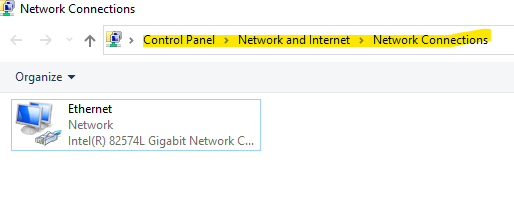
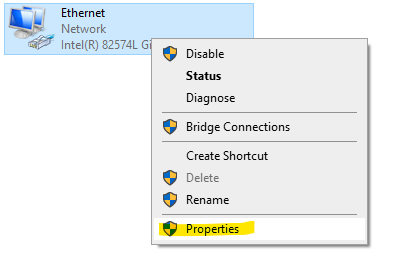
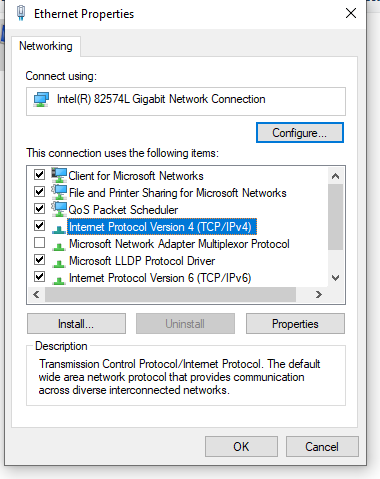
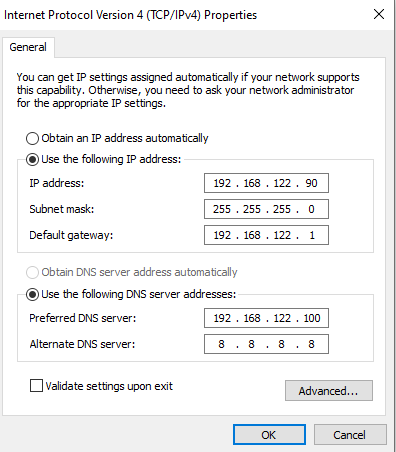
Control Panel → Network and Sharing Center → Change adapter settings → Right-click NIC → Properties → IPv4 → Properties, then set:
IP Address:       192.168.122.x   # unique IP for this machine
Subnet Mask:      255.255.255.0
Default Gateway:  192.168.122.1
Preferred DNS:    192.168.122.100  # your DC
Alternate DNS: 8.8.8.8 # fallbackAD uses DNS to locate domain services (Kerberos, LDAP). Without this, joining the domain will fail.
Step 2 — Join the Domain
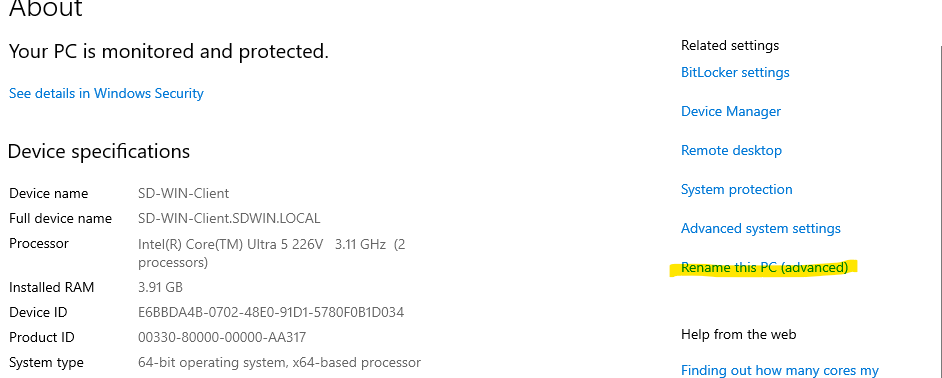
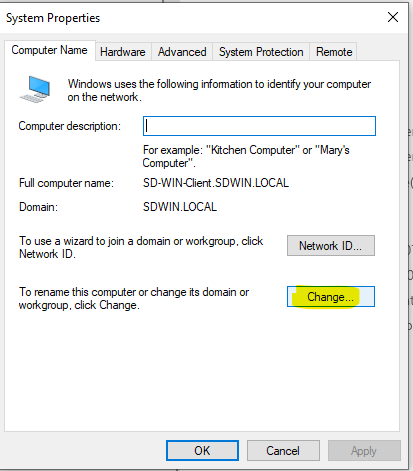
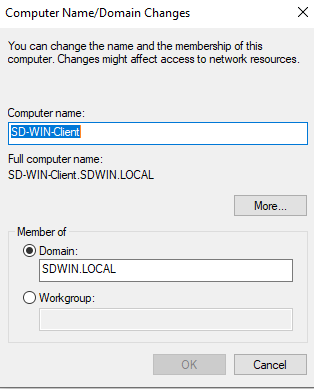
Right-click This PC → Properties → Rename this PC (advanced) → Change → select Member of Domain → type SDWIN.LOCAL → enter Administrator credentials when prompted → restart.
Log in with domain credentials: SDWIN\username or username@SDWIN.LOCAL.
Creating AD Groups and Users
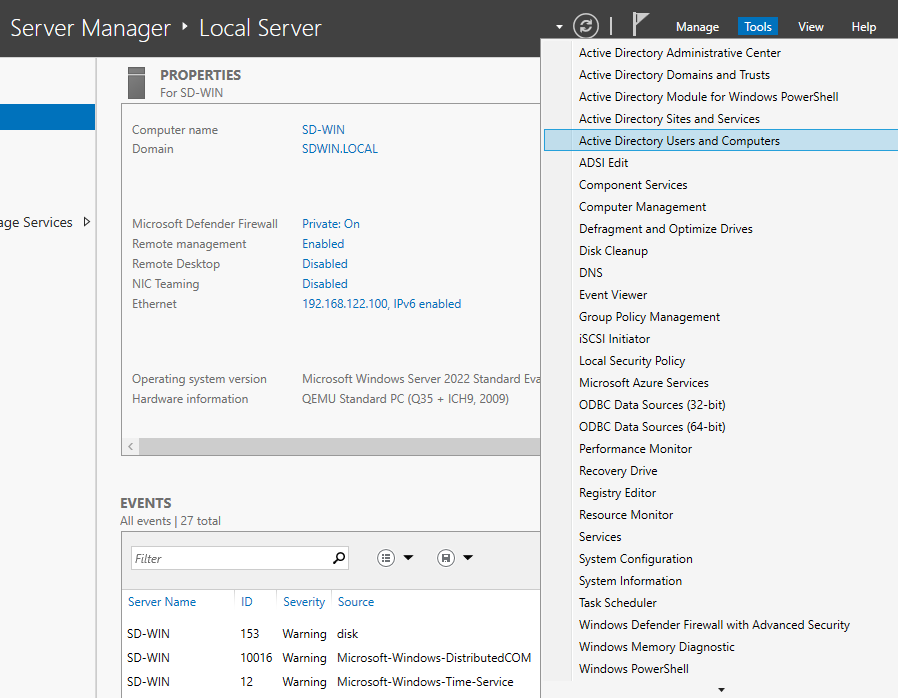
On the Domain Controller, open Server Manager → Tools → Active Directory Users and Computers.
Step 1 — Create Groups
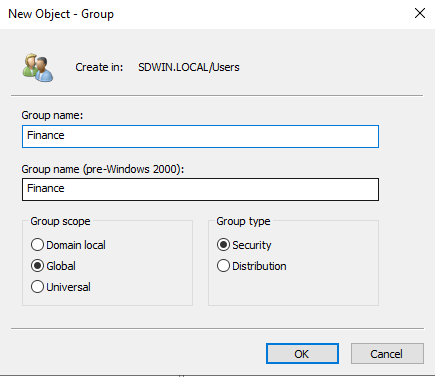
- Right-click the container → New → Group
- Group name:
Finance| Group scope: Global | Group type: Security - Repeat for
HRandIT

Step 2 — Create Users
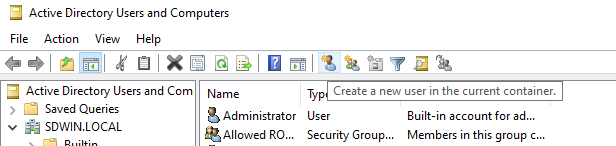
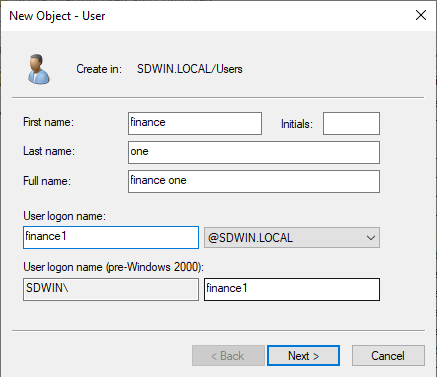
- Right-click the container → New → User
- Fill in First name, Last name, User logon name (e.g.
finance1) - Set a password; uncheck User must change password at next logon for lab use
Step 3 — Add Users to Groups
- Double-click the Finance group → Members tab → Add
- Type the username (e.g.
finance1) → Check Names → OK
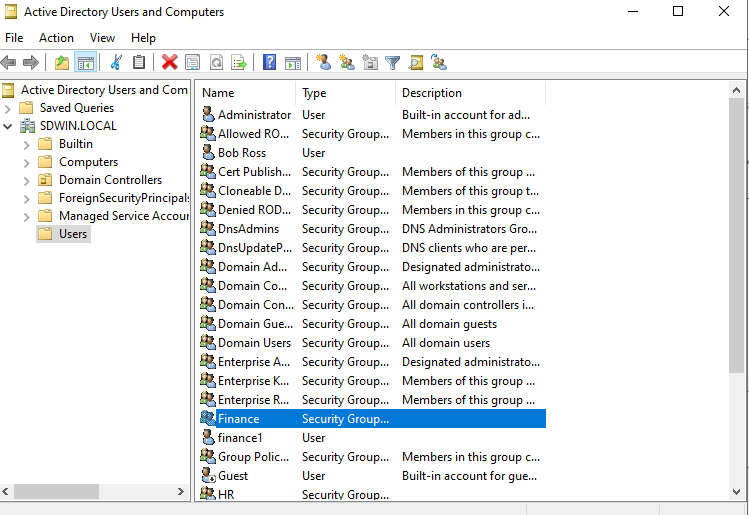
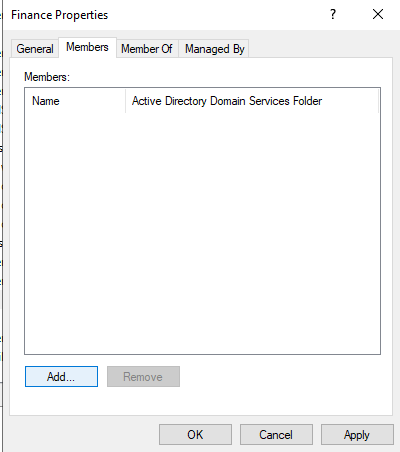
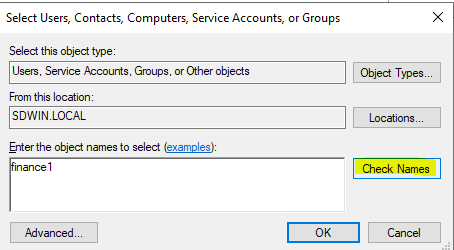
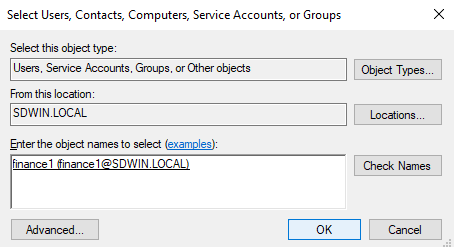
Verify from CMD on any domain machine:
net user finance1 /domainConfigure DNS Forwarder on DC
So your DC (and all domain machines using it as DNS) can resolve internet addresses:
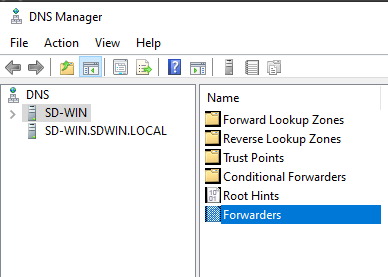
- Open DNS Manager on Windows Server
- Right-click your server name → Properties → Forwarders tab
- Add
8.8.8.8and1.1.1.1→ OK
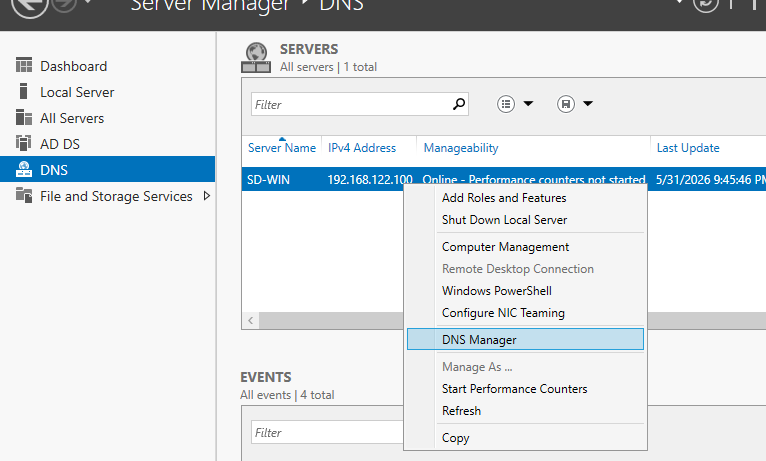
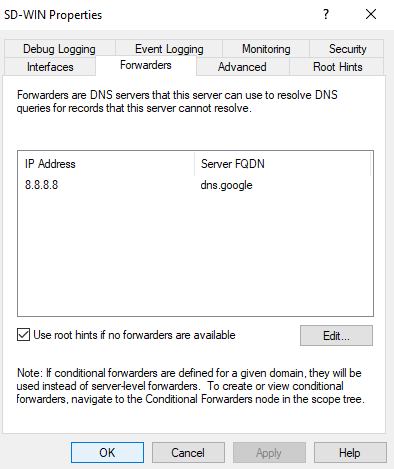
(like google.com) to public DNS resolvers.
Part 2 : Ubuntu Server: Network & Hostname
Configure Static IP with Netplan
Edit the netplan configuration file (check the filename with ls /etc/netplan/):
sudo nano /etc/netplan/01-netcfg.yamlnetwork:
version: 2
ethernets:
enp1s0: # use your actual NIC name (ip a)
dhcp4: no
addresses:
- 192.168.122.181/24
gateway4: 192.168.122.1
nameservers:
addresses:
- 192.168.122.100 # DC as primary DNS
- 8.8.8.8 # fallback
search:
- SDWIN.LOCALIndentation errors cause "invalid YAML" on netplan apply. The nameservers block sits at the same indent level as addresses — both under the NIC name.
sudo netplan apply
ping 192.168.122.100    # verify DC is reachable
nslookup SDWIN.LOCAL    # verify DNS resolves the domain
Set Hostname
sudo hostnamectl set-hostname SD-Ubuntu.SDWIN.LOCALUpdate /etc/hosts so the FQDN is listed first:
sudo nano /etc/hosts127.0.0.1 localhost
127.0.1.1 SD-Ubuntu.SDWIN.LOCAL SD-Ubuntu
192.168.122.181 SD-Ubuntu.SDWIN.LOCAL SD-Ubuntu
::1 ip6-localhost ip6-loopback
fe00::0 ip6-localnet
ff00::0 ip6-mcastprefix
ff02::1 ip6-allnodes
ff02::2 ip6-allroutersSamba warns and DNS update fails if this ordering is wrong.
hostname    # should return: SD-Ubuntu.SDWIN.LOCAL
hostname -f # should return: SD-Ubuntu.SDWIN.LOCAL
Configure Kerberos
sudo nano /etc/krb5.conf[libdefaults]
default_realm = SDWIN.LOCAL
dns_lookup_realm = false
dns_lookup_kdc = trueIf time is off: sudo apt install ntpdate -y && sudo ntpdate 192.168.122.100
Part 3 : Configure an Ubuntu Samba File Server with Active Directory Authentication
Install Packages
sudo apt update
sudo apt install samba winbind libpam-winbind libnss-winbind -y| Package | Purpose |
|---|---|
samba | The file sharing server — implements the SMB protocol |
winbind | Bridges Linux and AD — resolves domain users/groups, handles auth |
libpam-winbind | Allows PAM (login system) to authenticate via winbind |
libnss-winbind | Allows NSS (name service) to look up AD users with getent |
Configure /etc/samba/smb.conf
First back up the original:
sudo cp /etc/samba/smb.conf /etc/samba/smb.conf.bakEdit the [global] section only, do not delete the rest of the file:
sudo nano /etc/samba/smb.conf[global]
workgroup = SDWIN # NetBIOS name (no .LOCAL)
realm = SDWIN.LOCAL # Full Kerberos realm (uppercase)
security = ADS # Use Active Directory for auth
winbind use default domain = yes # Allow 'username' not 'SDWIN\username'
winbind offline logon = no # Don't cache credentials offline
log file = /var/log/samba/log.%m
logging = file
max log size = 1000
panic action = /usr/share/samba/panic-action %d
template shell = /bin/bash # Shell for AD users on Linux
template homedir = /home/%U # Home dir template for AD users
idmap config * : backend = tdb # Simple consistent mapping (can also use autorid)
idmap config * : range = 0-999999 # ID pool for non-SDWIN objects
idmap config SDWIN : backend = rid # Derive UID from Windows RID
idmap config SDWIN : range = 1000000-1999999 # Must not overlap * rangeThis is what makes Ubuntu a domain member. Without it (e.g. security = USER), Samba runs standalone and net ads join will fail saying "not configured as member server".
Verify the config:
testparmIf it shows ROLE_STANDALONE, security = ADS is missing or wrong.
Join Ubuntu to the AD Domain
sudo net ads join -U AdministratorEnter the Administrator password. Successful output ends with:
Joined 'SD-UBUNTU' to dns domain 'SDWIN.LOCAL'Verify the join:
sudo net ads testjoinIf join fails with "This operation is only allowed for the PDC": security = ADS is missing.
If it fails with Kerberos errors: fix time sync first (sudo ntpdate 192.168.122.100).
Configure NSSwitch
Tell Linux to use winbind when looking up users and groups:
sudo nano /etc/nsswitch.conf# Before:
passwd: files systemd
group: files systemd
# After:
passwd: files systemd winbind
group: files systemd winbindgetent passwd and getent group will not return AD users/groups even if winbind is working.
Start and Enable Services
sudo systemctl restart smbd nmbd winbind
sudo systemctl enable  smbd nmbd winbind
Verify AD users are now visible:
wbinfo -u                          # list all AD users
wbinfo -g                          # list all AD groups
wbinfo -i finance1                 # look up a specific user
getent passwd 'SDWIN\\finance1'    # resolve user via NSS
Create Shared Folders
sudo mkdir -p /srv/shares/finance
sudo mkdir -p /srv/shares/hr
sudo mkdir -p /srv/shares/it
Add share definitions to smb.conf after the [global] section:
[Finance]
    path = /srv/shares/finance
    browseable = yes
    read only = no
    valid users = @"SDWIN\\Finance"   # @ = group; only Finance members
    create mask = 0660               # new files: owner rw, group rw, others none
    directory mask = 0770            # new dirs: owner rwx, group rwx, others none

[HR]
    path = /srv/shares/hr
    browseable = yes
    read only = no
    valid users = @"SDWIN\\HR"
    create mask = 0660
    directory mask = 0770

[IT]
    path = /srv/shares/it
    browseable = yes
    read only = no
    valid users = @"SDWIN\\IT"
    create mask = 0660
    directory mask = 0770
Set Folder Ownership and Permissions
# First find the correct GID for each AD group:
wbinfo --sid-to-gid $(wbinfo --name-to-sid 'SDWIN\Finance')
wbinfo --sid-to-gid $(wbinfo --name-to-sid 'SDWIN\HR')
wbinfo --sid-to-gid $(wbinfo --name-to-sid 'SDWIN\IT')

# Use the GID numbers returned above (example: 1001110, 1001111, 1001112)
sudo chown root:1001110 /srv/shares/finance
sudo chown root:1001111 /srv/shares/hr
sudo chown root:1001112 /srv/shares/it

sudo chmod 2770 /srv/shares/finance
sudo chmod 2770 /srv/shares/hr
sudo chmod 2770 /srv/shares/it

ls -la /srv/shares/ # verify ownershipIt ensures any new file created inside the share inherits the group (Finance/HR/IT) automatically, so group permissions stay consistent.
sudo systemctl restart smbd nmbd winbind
testparm
Part 4 : How to Join Kali Linux to an Active Directory Domain
Kali uses Samba/Winbind only (not realmd/sssd) for AD integration. This is appropriate for penetration testing environments.
Install Packages
sudo apt update
sudo apt install samba winbind libpam-winbind libnss-winbind krb5-user -y
When prompted for Kerberos realm, enter: SDWIN.LOCAL
Configure smb.conf on Kali
sudo nano /etc/samba/smb.conf[global]
workgroup = SDWIN
realm = SDWIN.LOCAL
security = ADS
winbind use default domain = yes
winbind offline logon = no
template shell = /bin/bash
template homedir = /home/%U
idmap config * : backend = tdb
idmap config * : range = 0-999999
idmap config SDWIN : backend = rid
idmap config SDWIN : range = 1000000-1999999testparm # should show ROLE_DOMAIN_MEMBERConfigure Kerberos on Kali
sudo nano /etc/krb5.conf[libdefaults]
default_realm = SDWIN.LOCAL
dns_lookup_realm = false
dns_lookup_kdc = trueSet DNS and Hostname on Kali
sudo nano /etc/resolv.confnameserver 192.168.122.100
search SDWIN.LOCALsudo hostnamectl set-hostname kali.SDWIN.LOCAL
sudo nano /etc/hosts
# Add: 192.168.122.x kali.SDWIN.LOCAL kaliJoin Kali to the Domain
sudo net ads join -U Administrator
sudo net ads testjoin
Configure NSSwitch:
sudo nano /etc/nsswitch.confpasswd: files systemd winbind
group: files systemd winbindsudo systemctl restart winbind
wbinfo -u # verify AD users visible
wbinfo -g # verify AD groups visibleAccess Samba Shares from Kali (Without Joining Domain)
If you only want to test shares without joining, use smbclient directly:
# List all shares on the file server
smbclient -L //192.168.122.181 -U 'SDWIN\\finance1'

# Connect to Finance share
smbclient //192.168.122.181/Finance -U 'SDWIN\\finance1'

# Test a denied user — should return NT_STATUS_ACCESS_DENIED
smbclient //192.168.122.181/Finance -U 'SDWIN\\hruser1'
Commands inside the smbclient prompt:
ls              # list files
put file.txt    # upload file
get file.txt    # download file
mkdir testdir   # create directory
exit            # quit
Query AD users from Kali using rpcclient (no domain join needed):
rpcclient -U 'SDWIN\\Administrator' 192.168.122.100

# Inside rpcclient prompt:
enumdomusers    # list all AD users
enumdomgroups   # list all AD groups
Part 5 : Testing File Share Access
From Windows Client
Open File Explorer and navigate to:
\\192.168.122.181\FinanceLog in with a Finance group member (e.g. SDWIN\finance1). Access should be granted. Try with a user not in Finance, access should be denied.
From Ubuntu (smbclient)
smbclient //192.168.122.181/Finance -U 'SDWIN\\finance1'Verify AD Resolution on Ubuntu File Server
wbinfo -u                                  # list all AD users
wbinfo -g                                  # list all AD groups
wbinfo --user-groups finance1              # groups finance1 belongs to
wbinfo -i finance1                         # resolve user details
getent group  'SDWIN\\Finance'             # check Finance group members
getent passwd 'SDWIN\\finance1' # resolve user to Linux UIDWinbind cannot reach the DC. Check: sudo systemctl status winbind and ping 192.168.122.100.
Part 6 : Complete Teardown & Cleanup
Use this section to undo everything and start fresh. Follow in order.
Step 1 — Remove Ubuntu from the AD Domain
sudo net ads leave -U AdministratorIt holds the domain join credentials and winbind needs it to connect to the DC. If deleted, winbind will fail to start and you must rejoin with net ads join.
Step 2 — Remove Samba Shares and Data
sudo rm -rf /srv/shares/finance
sudo rm -rf /srv/shares/hr
sudo rm -rf /srv/shares/it
Step 3 — Restore Original smb.conf
sudo cp /etc/samba/smb.conf.bak /etc/samba/smb.conf

# Or wipe it entirely and reinstall samba for a clean default:
sudo apt purge samba winbind libpam-winbind libnss-winbind -y
sudo apt autoremove -y
sudo rm -rf /etc/samba /var/lib/samba /var/cache/samba
Step 4 — Clear Samba Cache
sudo net cache flush

# Safe cache cleanup — NEVER delete secrets.ldb:
sudo rm -f /var/lib/samba/winbindd_idmap.tdb
sudo rm -f /var/lib/samba/winbindd_cache.tdb
Step 5 — Revert NSSwitch
Edit /etc/nsswitch.conf and remove winbind:
passwd: files systemd
group:  files systemd
Step 6 — Revert Hostname (optional)
sudo hostnamectl set-hostname ubuntu-server
sudo nano /etc/hosts   # remove the SDWIN.LOCAL lines
Step 7 — Stop and Disable Services
sudo systemctl stop    smbd nmbd winbind
sudo systemctl disable smbd nmbd winbind
Reinstall Fresh (to redo from scratch)
sudo apt update
sudo apt install samba winbind libpam-winbind libnss-winbind -y
# Now follow Part 3 again from the beginning
Troubleshooting Reference
| Error / Symptom | Fix |
|---|---|
| ROLE_STANDALONE in testparm | security = ADS is missing or set to USER in [global] |
| Only allowed for PDC of domain | security = ADS missing. Ubuntu thinks it's a DC, not a member. |
| NT_STATUS_ACCESS_DENIED despite correct group | GID mismatch from old autorid mappings. Run wbinfo --sid-to-gid $(wbinfo --name-to-sid 'SDWIN\\Finance') to get correct GID and use it directly with chown. |
| wbinfo -u: Error looking up domain users | Winbind can't reach DC. Check: systemctl status winbind, ping 192.168.122.100 |
| net ads join: Kerberos error | Clock difference > 5 min. Run: sudo ntpdate 192.168.122.100 |
| net ads join: Join not valid | Domain left or machine account deleted in AD. Rejoin with net ads join. |
| idmap tdb vs autorid confusion | Use tdb not autorid as the * backend. autorid causes GID inconsistency. Also check spelling: tdb not tbd. |
| winbind.service: exit-code failure | Run: sudo winbindd -F -S to see the actual error message |
| DNS update failed on join | /etc/hosts FQDN not listed first, or hostname not set to FQDN |
| Unidentified Network on Windows | No gateway set on Windows NIC, or VM on wrong virtual network |
To learn more about Active Directory click here